

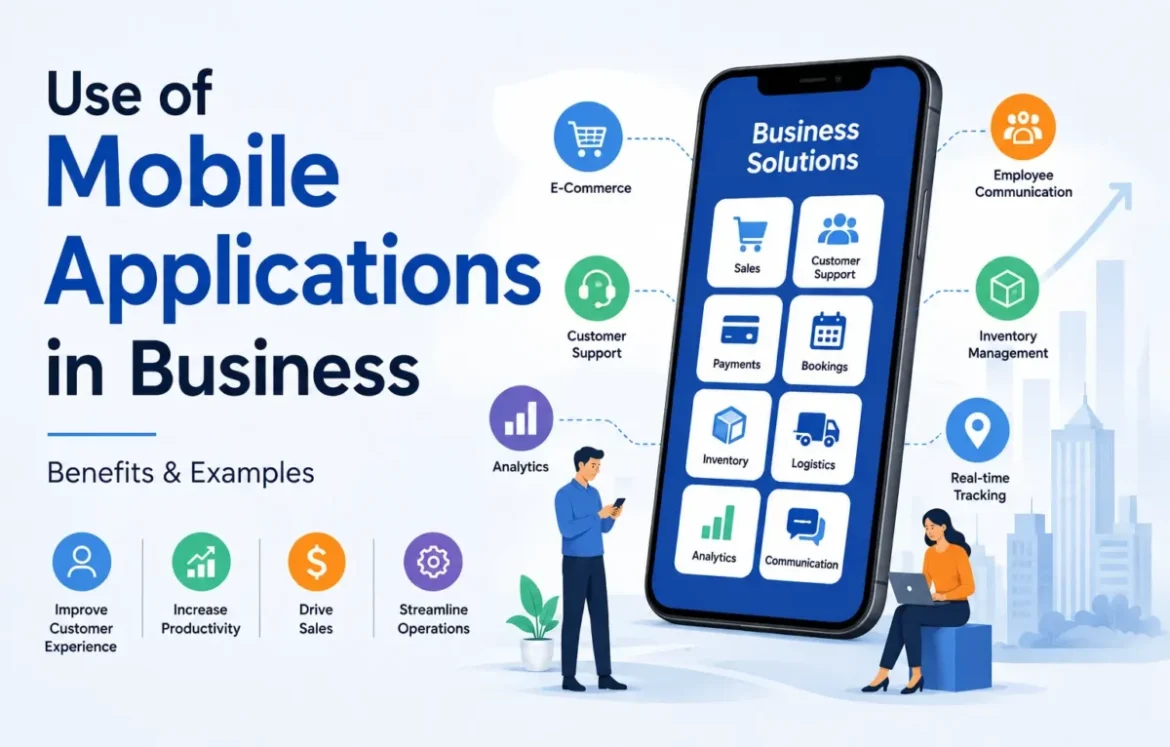
Mobile applications are used in business for far more than selling products. The use of mobile applications in business includes customer service, marketing, payments, bookings, employee communication, inventory management, field operations, logistics, and real-time reporting. Some apps are customer-facing, while others help employees perform tasks away from a desktop.
The real power of mobile applications is their ability to put useful business functions on a device people carry throughout the day. However, an app only creates value when it solves a genuine customer or operational problem. Not every business needs one, and in some cases a well-designed mobile website is the better choice.
What Is a Mobile Application?
A mobile application, or mobile app, is software designed to run on smartphones and tablets. Businesses use mobile apps for shopping, payments, customer service, communication, inventory management and other daily operations.
The use of mobile applications in business includes both customer-facing services and internal tools that help employees work more efficiently.
How Are Mobile Applications Used in Business?
Businesses use mobile applications to sell products, process payments, communicate with customers, provide support, manage bookings, coordinate employees, access CRM data, control inventory, manage field work, track deliveries and view business analytics.
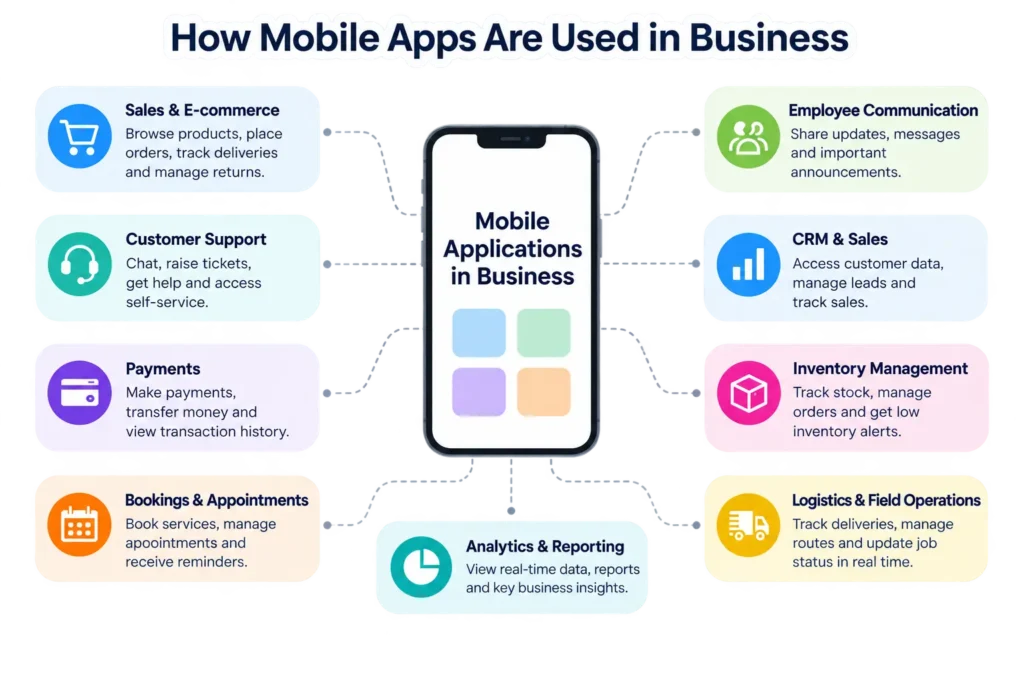
A simple way to understand their role is to divide business apps into four groups:
| Type of Mobile App | Primary Purpose | Common Examples |
|---|---|---|
| Customer-facing | Serve and communicate with customers | Shopping, banking, booking |
| Employee-facing | Help employees perform work | CRM, scheduling, communication |
| Operational | Manage business processes | Inventory, logistics, field service |
| Revenue-generating | Deliver a paid digital service | Subscriptions, marketplaces, digital content |
The categories can overlap. A retailer’s app, for example, might allow customers to shop while simultaneously feeding order information into inventory, payment and analytics systems.
12 Common Uses of Mobile Applications in Business
The most important uses of business mobile apps extend across customer experience and internal operations. Understanding these individual applications is more useful than simply saying that apps “increase engagement.”
1. Mobile Sales and E-Commerce
Retailers and other sellers use mobile applications to let customers browse products, compare options, place orders, make payments and check order status from a smartphone.
A typical mobile-commerce journey might look like this:
Browse → Select → Pay → Track → Buy Again
An account-based app can also retain useful information such as order history, delivery addresses, saved products and preferences, reducing friction during repeat purchases.
Research on mobile-app marketing has examined apps as part of the customer journey and notes their ability to support activities including accessing information and making purchases.
The value isn’t simply “having an app.” It comes from making a recurring purchasing task easier.
2. Customer Service and Support
A mobile app can turn customer support into an always-available self-service channel. Depending on the business, customers may be able to:
- start a live chat;
- interact with a chatbot;
- create support tickets;
- find troubleshooting information;
- view an order or service status;
- manage their account;
- upload photos or documents;
- receive support updates.
For companies handling large numbers of routine questions, self-service features can reduce unnecessary steps for both customers and support teams.
AI is also expanding this use case. AI-powered assistants can interpret natural-language questions and provide contextual responses, although businesses still need appropriate escalation paths when automated support cannot resolve a problem.
3. Mobile Marketing
Businesses can use mobile apps as a direct communication channel with customers who have chosen to install the application and permit relevant notifications.
Common uses include:
- product announcements;
- personalized offers;
- promotional campaigns;
- event reminders;
- price or availability alerts;
- location- or context-relevant information.
This direct access is powerful, but it can easily become counterproductive. Excessive or irrelevant notifications give users a reason to disable notifications, or remove the app altogether.
Effective mobile marketing therefore depends more on relevance and permission than notification volume.
4. Customer Loyalty and Retention
Restaurants, retailers, airlines, hotels and other repeat-purchase businesses often incorporate loyalty functions into their mobile applications.
An app might let a customer:
- collect points;
- redeem rewards;
- access membership benefits;
- receive personalized offers;
- track progress toward rewards;
- save previous purchases;
- reorder frequently purchased items.
This is particularly useful when the app gives customers a recurring reason to return rather than functioning as a one-time promotional download.
5. Mobile Payments and Transactions
Mobile applications have become an important interface for digital transactions. Depending on the industry, an app may support:
- product checkout;
- bill payments;
- bank transfers;
- digital wallets;
- subscription payments;
- invoice payments;
- transaction histories.
Financial services demonstrate how far this model can go. Modern FinTech development combines mobile interfaces with technologies such as APIs, automation and AI to support activities including payments, banking and personal finance.
Security, authentication and privacy are particularly important whenever an app handles financial information.
6. Booking and Appointment Management
Mobile applications can simplify transactions that revolve around time rather than physical products.
They are commonly used for:
Hotels: room reservations and guest services
Restaurants: table reservations and food orders
Healthcare: appointment scheduling
Transportation: rides and tickets
Salons: appointment booking
Professional services: consultations and scheduling
Instead of calling a business during working hours, a customer can potentially check availability, make a booking, reschedule and receive reminders from the same interface.
7. Employee Communication and Collaboration
Not all business apps are designed for customers. Internal applications can give employees access to communication and workplace functions wherever their work takes them.
Common capabilities include:
- team messaging;
- company announcements;
- document access;
- task management;
- shift information;
- approvals;
- internal knowledge;
- collaboration.
This is particularly relevant to distributed teams and employees who don’t spend their entire working day at a desk.
Research on digital transformation similarly identifies management apps as tools for improving employee engagement and productivity through scheduling, automation and real-time communication.
8. CRM and Mobile Sales Management
A salesperson visiting a customer shouldn’t necessarily have to return to a laptop to check a lead or update a deal. Mobile customer relationship management applications can provide access to:
- customer profiles;
- leads;
- opportunities;
- meeting notes;
- sales tasks;
- account history;
- pipeline information.
A salesperson could finish a meeting, update the customer’s record immediately and make that information available to colleagues. The app becomes a mobile interface to the wider business system rather than a standalone tool.
9. Inventory and Warehouse Management
Mobile applications are also useful where employees physically move around a warehouse, store or facility. Workers can potentially use phones, tablets or dedicated mobile devices to:
- scan barcodes or QR codes;
- check stock;
- record incoming goods;
- update inventory;
- locate products;
- perform stock counts;
- receive low-stock alerts.
The important advantage here is context: the employee can record or retrieve information where the inventory actually exists instead of writing it down and entering it into another system later.
10. Field Service Management
Field service is one of the clearest examples of why a mobile app can provide capabilities that a desktop system cannot conveniently deliver. Consider a maintenance technician:
Job assigned → Work details received → Customer location opened → Work completed → Photos uploaded → Signature captured → Job closed
The technician may need access to customer history, equipment details, checklists, parts information and documentation while physically working at a customer location. In this scenario, mobility isn’t a marketing feature. It is part of the operational workflow.
11. Logistics and Delivery Tracking
Mobile applications connect drivers, dispatch teams, warehouses and customers.
They can support:
- route information;
- driver communication;
- shipment status;
- barcode scanning;
- delivery updates;
- proof of delivery;
- customer tracking.
A delivery driver, for example, might receive the next stop, navigate to it, scan the package, capture proof of delivery and update the central system without returning to an office.
12. Business Analytics and Reporting
Managers increasingly need information outside a traditional office environment. Mobile dashboards can provide access to information such as:
- sales performance;
- inventory levels;
- operational activity;
- customer metrics;
- financial indicators;
- project progress.
Mobile access doesn’t automatically create better decisions. Its value is making relevant information available at the time and place a decision needs to be made.
The Power of Mobile Applications in Modern Business
The power of mobile applications comes from combining accessibility with capabilities that fit naturally into mobile situations. A smartphone can provide a camera, location information, biometric authentication, notifications and other device features while remaining connected to cloud-based business systems.
That creates opportunities that go beyond shrinking a desktop website onto a smaller screen.
Consider these three situations:
Customer: receives an order update while away from a computer.
Salesperson: checks account information immediately before meeting a client.
Technician: uploads a photo and closes a service job from the customer’s location.
The common advantage is not the app itself. It is the ability to perform the right digital task at the point where it is needed.
Research provides some evidence of the wider business impact. A study of 343 SMEs examined mobile-app-based business processes and found that increased mobile-app use was associated with improvements in long-term SME efficiency. However, the research was conducted in a specific SME and pandemic-era context, so it should not be interpreted as proof that every business will achieve the same result simply by launching an app.
Key Advantages of Mobile Apps in Businesses
The main advantages of mobile applications are convenient access, direct communication, support for mobile workflows, personalization, real-time information, customer self-service and integration with business systems.
The size of each benefit depends on the app, industry and user behavior.
Greater Customer Convenience
A well-designed app can reduce the number of steps required to complete frequent tasks.
Customers might reorder a product, pay a bill, check a booking or contact support without searching for the company’s website and entering the same information repeatedly.
Direct Customer Communication
Apps can provide account-specific messages, alerts and notifications. This can be particularly valuable for information that is time-sensitive, such as:
- delivery updates;
- payment alerts;
- appointment reminders;
- booking changes;
- security notifications.
More Personalized Experiences
With appropriate consent and data practices, applications can adapt experiences around relevant account information, preferences and previous interactions. Personalization can range from saved settings to product recommendations.
Businesses should nevertheless treat personalization as a data-governance issue as well as a marketing opportunity. Collecting more customer information than necessary creates additional privacy and security responsibilities.
More Efficient Mobile Workflows
For employees, the strongest advantage may have nothing to do with customer engagement.
An inventory worker can scan stock.
A delivery driver can confirm a delivery.
A technician can complete a service report.
A salesperson can update a CRM record.
The app brings the software into the environment where the work occurs.
Access to Real-Time Information
Mobile apps connected to backend systems can make current information available without requiring employees or customers to return to a desktop.
For example, an inventory application might display updated stock while a sales app shows the latest account information.
Customer Retention Opportunities
An app that provides recurring value can become part of a customer’s routine. Saved preferences, loyalty benefits, account history, quick reordering and useful notifications can all provide reasons to return.
But installation alone does not create loyalty. If the application adds little value, users have little reason to keep it.
New Revenue Opportunities
Mobile applications can also form part—or all—of a company’s revenue model.
Examples include:
- mobile commerce;
- subscriptions;
- marketplaces;
- digital services;
- premium features;
- transaction-based platforms.
In these cases, the app isn’t simply supporting the business. It can be one of the places where the business itself happens.
Examples of Mobile Applications in Business by Industry
The role of mobile apps changes significantly between industries.
| Industry | Common Business Uses |
|---|---|
| Retail | Shopping, payments, loyalty, order tracking |
| Banking & FinTech | Transfers, account management, payments, alerts |
| Restaurants | Ordering, reservations, delivery, rewards |
| Healthcare | Appointments, patient communication, service access |
| Logistics | Routing, scanning, tracking, proof of delivery |
| Real estate | Property discovery, inquiries, viewing appointments |
| Hospitality | Reservations, check-in, guest services |
| Field services | Job assignments, reporting, navigation, signatures |
Retail and E-Commerce
Retail apps connect product discovery with transactions and post-purchase services.
A single application might support browsing, personalized recommendations, checkout, loyalty rewards, delivery tracking and customer support.
Banking and Financial Services
Banking apps demonstrate how mobile applications can turn complex services into everyday self-service functions.
Customers can potentially check balances, make transfers, pay bills and receive security notifications from the same device.
Restaurants
Restaurant apps can combine ordering, reservations, payments, delivery tracking and loyalty.
The app is most valuable when customers interact with the restaurant repeatedly; a customer visiting once while travelling may have much less reason to install one.
Healthcare
Healthcare organizations can use mobile applications for appointment management, service information and patient communication.
Because health data can be particularly sensitive, security, privacy, regulatory obligations and appropriate access controls need to be considered from the beginning rather than added later.
Logistics
Logistics applications can connect activities occurring across warehouses, vehicles and delivery locations.
Drivers and warehouse employees can update information from where the physical activity occurs, while customers can receive relevant tracking information.
Real Estate
Property apps can make listings easier to explore on mobile devices and support activities such as saved properties, inquiries, alerts and viewing requests.
Location capabilities can also be particularly relevant when users search for property around a particular area.
Hospitality
Hotel applications can extend beyond reservations to check-in, account information, service requests and communication during a stay.
Again, whether a dedicated app makes sense depends on the frequency and depth of the customer relationship.
Field Service Businesses
Maintenance, repair, inspection and installation businesses can use apps as working tools for technicians.
This is a fundamentally different business case from a branded consumer app because the primary goal is operational efficiency, not app-store visibility.
How Mobile Apps Connect With Other Business Systems
A modern business application rarely operates completely alone. A shopping app might need product information from an inventory database, customer data from a CRM, payments from a payment provider and delivery information from a logistics platform.
Conceptually, the architecture may look like:
Mobile App → API → Business Systems
Those systems might include:
CRM | ERP | Inventory | Payments | Analytics | Cloud Services
Through API Integration a software systems or app communicates and exchange data. For example, a food-delivery app could use one service for maps, another for payments and its own systems for customer and order information.
As the number of connected applications grows, the broader issue becomes software integration: making different tools function as a coordinated environment instead of isolated systems. Software integration can involve approaches such as point-to-point connections, middleware and integration platforms.
This integration layer is what allows a mobile app to display current business information rather than becoming another disconnected data silo.
Mobile App vs Mobile Website: Which Is Better for Business?
A mobile app is not automatically better than a mobile website. Apps tend to make more sense for frequent interactions, deeper device integration and mobile-specific workflows, while websites are usually easier to access and discover because visitors do not have to install anything first.
| Factor | Mobile App | Mobile Website |
|---|---|---|
| Installation | Required | Not required |
| Search discoverability | More limited | Strong |
| Device integration | Strong | Varies by capability/browser |
| Offline capability | Can be strong | Usually more constrained |
| Repeat interactions | Excellent when app is useful | Good |
| Initial reach | More friction | Broad |
| Development | Can require multiple platforms/approaches | Usually simpler |
| Maintenance | Ongoing app + backend maintenance | Ongoing web maintenance |
The right question is therefore not:
Should every business have an app?
It is:
Is there something our customers or employees need to do frequently enough on mobile that a dedicated application would materially improve the experience?
Does Every Business Need a Mobile App?
No. Every business does not need a mobile app.
A dedicated application makes the most sense when customers or employees have a recurring reason to use it, or when mobile-specific capabilities significantly improve a business process.
An app may be worth considering when:
- customers transact frequently;
- employees regularly work away from desks;
- offline functionality matters;
- device features are important to the workflow;
- account-specific notifications provide real utility;
- mobile transactions are central to the service;
- customers have a strong reason to return regularly.
A mobile website may be sufficient when most visitors only need information occasionally, search engines are an important discovery channel, or the proposed application would simply reproduce the website without providing meaningful additional functionality.
What Are the Challenges of Using Mobile Applications in Business?
Mobile apps introduce costs and responsibilities alongside their benefits.
Development and Maintenance
Building the first version isn’t the end of the project. Operating-system changes, new device sizes, security updates, backend changes and evolving customer requirements can require ongoing development.
Security
Applications that access customer accounts or business systems can become valuable targets. Security planning may involve authentication, authorization, encrypted communications, secure storage, dependency management, monitoring and careful API design.
Privacy
Mobile apps can potentially process information such as location, account activity and behavioral data. Businesses should have a legitimate purpose for the information they collect and apply the privacy and regulatory requirements relevant to their users and jurisdictions.
User Adoption
A company can build an excellent app and still struggle to persuade customers to install it. Installation introduces friction that a normal website does not have.
That makes the app’s value proposition important: Why should this live permanently on someone’s phone?
Integration Complexity
A useful business app may need information from multiple systems. Connecting customer, payment, inventory and operational data can become technically complex, especially when a business uses older systems. This is one reason connected applications depend heavily on well-designed APIs and broader integration architecture.
Accessibility and Device Compatibility
Apps should account for different screen sizes, operating-system versions and accessibility needs. A feature that works perfectly on one device should not be assumed to provide the same experience everywhere.
How AI Is Changing Mobile Applications in Business
Artificial intelligence is expanding what mobile applications can do, but AI is a capability, not a requirement for a successful business app. Businesses are incorporating AI into mobile experiences for tasks such as:
AI Customer Support
Natural-language assistants can answer common questions, guide users through processes and retrieve relevant information.
Personalized Recommendations
AI systems can analyze appropriate signals to help rank products, content or services around a user’s needs.
Fraud and Anomaly Detection
Financial applications can use machine-learning systems behind the mobile interface to identify unusual activity and support risk controls.
Image and Document Processing
A mobile camera can become an input mechanism for AI systems that classify images, extract information from documents or assist with inspections.
Predictive Insights
Operational applications can surface forecasts or potential issues to employees rather than merely displaying historical data.
Generative AI Assistants
Generative AI can provide conversational interfaces for searching information, summarizing data or assisting with workflows.
These capabilities also depend on the wider technology behind the app. AI models, databases, APIs and business software may all work together while the mobile application acts as the user’s interface.
How to Decide Whether Your Business Needs a Mobile App
Before investing in an application, ask six questions.
- Will customers or employees use it frequently?
- What can the app do that the mobile website cannot do as effectively?
- Does the use case benefit from mobile-device capabilities?
- Which existing business systems must it connect to?
- What customer or operational problem will it solve?
- Can the business maintain, secure and improve it over time?
A simple decision framework looks like this:
| Business Situation | Likely Direction |
|---|---|
| Frequent customer transactions | App can offer strong value |
| Field workforce | Strong mobile-app use case |
| Mostly one-time informational visits | Mobile website often sufficient |
| Significant offline requirements | App may be preferable |
| Search is the primary acquisition channel | Website remains essential |
| Complex mobile employee workflow | Internal app may be valuable |
| No clear benefit beyond the website | Reconsider building an app |
The strongest business case starts with the problem, not the technology.
The Future of Mobile Applications in Business
Business applications are becoming less isolated and more deeply connected with cloud services, AI, APIs and wider software ecosystems.
Current directions include AI-assisted experiences, richer automation, contextual personalization, stronger security controls and applications that coordinate information across multiple business systems. Modern mobile app development trends leans more towards AI-driven applications and other technologies influencing how mobile software is evolving.
But the fundamental test is unlikely to change: a useful business application must make something meaningfully easier, faster or more accessible for the person using it.
Final Thoughts
The use of mobile applications in business has expanded from simple customer-facing tools to a much broader role in digital operations. Apps can support commerce, payments and customer service while also helping employees manage sales, inventory, field work, logistics and business information.
The power of mobile applications, however, should not be measured by how many features they contain. It comes from solving a recurring problem at the moment and place where the user needs a solution.
For some companies, that makes a dedicated mobile app an important part of the business. For others, a responsive website or existing business software will be enough. The best decision starts by identifying the customer or operational need first—and choosing the technology second.
Frequently Asked Questions
What is a mobile application?
A mobile application is software designed to run on a mobile device such as a smartphone or tablet. Mobile apps can provide functions such as communication, shopping, banking, navigation, entertainment and business management. Business apps may be designed for customers, employees or both.
What are the common uses of mobile apps?
Common uses of mobile apps include communication, shopping, banking, payments, booking, navigation, entertainment, customer support and social networking. In businesses, apps are also used for CRM access, employee communication, inventory management, field service, logistics, analytics and workflow management.
What is the use of mobile applications in business?
The use of mobile applications in business includes sales, marketing, customer support, payments, loyalty programs, bookings, employee collaboration, CRM, inventory, field service, logistics and analytics. Customer-facing apps improve access to services, while internal applications help employees complete work from mobile locations.
What are examples of the use of mobile applications in business?
Examples include a retailer allowing customers to shop and track orders, a bank enabling mobile transfers, a restaurant accepting orders, a technician completing service reports in the field, a warehouse worker scanning inventory and a delivery driver recording proof of delivery.
What are the advantages of mobile applications?
The main advantages of mobile applications include convenient access, support for mobile workflows, direct communication, personalization, real-time information, customer self-service and access to device capabilities. The exact benefits depend on the app’s purpose and how frequently customers or employees actually use it.
What are the 10 advantages of mobile applications?
Ten potential advantages are convenience, mobility, faster access, personalization, customer communication, employee productivity, self-service, real-time information, operational efficiency and new revenue opportunities. These are potential benefits rather than guaranteed outcomes; an app still needs a useful purpose, good design, reliable systems and sufficient user adoption.
Are mobile apps profitable?
Mobile apps can be profitable, but profitability is not guaranteed. Revenue can come from product sales, subscriptions, transactions, advertising, marketplaces or paid digital services. An internal business app can also create economic value by improving a workflow rather than generating revenue directly. Development, maintenance, marketing, infrastructure and support costs should be considered when evaluating profitability.
How do mobile apps help small businesses?
Mobile apps can help small businesses sell products, communicate with customers, manage appointments, accept payments, coordinate employees and access business information remotely. Research involving 343 SMEs found an association between increased mobile-app usage and improved long-term business efficiency, although results from one study should not be generalized to every company or market.
What is the power of mobile applications?
The power of mobile applications is their ability to make digital services and business processes available where users need them. Apps can combine mobile access with notifications, cameras, location features, authentication and connections to cloud systems, allowing customers and employees to perform tasks without being tied to a desktop.
What are the disadvantages of mobile applications in business?
Potential disadvantages include development costs, ongoing maintenance, security and privacy responsibilities, integration complexity, app-store requirements, compatibility issues and difficulty convincing users to install and retain an app. Businesses should compare these costs with the customer or operational value the application is expected to provide.
Is a mobile app better than a website for a business?
Not necessarily. A mobile app is often better for frequent interactions, mobile-specific workflows and deeper device integration. A mobile website is usually easier to discover and access because installation isn’t required. Many businesses benefit from a mobile-friendly website without needing their own dedicated app.