


Choosing a POS today is about much more than finding a faster way to accept payments. The best POS systems combine checkout, inventory, customer management, reporting, payments, and increasingly automation into one platform.
But the right system depends heavily on how you operate. A restaurant needs table management and kitchen workflows, while a retailer may care more about SKUs, purchase orders, multi-location inventory, and e-commerce synchronization.
For this 2026 comparison, we evaluated leading POS platforms based on pricing, usability, inventory capabilities, hardware, integrations, customer support, scalability, and suitability for different business types.
Best POS Systems in 2026: Quick Comparison
| POS System | Best For | Starting Software Price* | Standout Strength |
|---|---|---|---|
| Square POS | Small businesses | $0/month | Easy entry and flexible ecosystem |
| Toast | Restaurants | $0/month | Restaurant-specific operations |
| Shopify POS | Omnichannel retail | Shopify plan required | Online + in-store synchronization |
| Lightspeed Retail | Inventory-heavy retail | $89/month | Advanced inventory |
| Clover | Flexible hardware setups | Varies | POS hardware ecosystem |
| TouchBistro | Independent restaurants | Quote-based/current plan | Restaurant workflows |
| SpotOn | Full-service restaurants | $0/station/month | Restaurant operations and support |
| Helcim | Cost-conscious merchants | No monthly POS fee | Payment pricing |
| Loyverse | Micro businesses | Free core POS | Low-cost entry |
| PayPal POS | Mobile sellers | No regular POS subscription for basic use | Simple mobile payments |
Pricing varies by country, hardware, payment processing, add-ons and contract. Prices should always be confirmed directly with the provider before purchasing.
How We Evaluated the Best POS Systems
A low monthly subscription alone doesn’t make a POS good value. We looked at the broader operating experience, including:
- POS software and hardware costs
- Payment-processing structure
- Inventory and order management
- Reporting and analytics
- Ease of setup and staff training
- E-commerce and third-party integrations
- Offline capabilities
- Customer and loyalty tools
- Multi-location support
- Customer service availability
- Ability to scale as a business grows
Pricing was checked against current provider information where available. Because POS providers frequently change plans, hardware promotions and processing rates, businesses should request a current quote based on their location and transaction volume.
10 Best POS Systems for Businesses in 2026
1. Square POS: Best Overall for Small Businesses
Square remains one of the easiest POS platforms for a small business to adopt without making a large upfront software commitment.
Square’s current U.S. POS lineup includes a Free plan at $0 per location, with Plus and Premium tiers for businesses that need more functionality. Its ecosystem goes beyond taking payments to cover inventory, online selling, staff management, invoicing and business reporting.
Best for: small retailers, cafés, service businesses, pop-up shops and growing businesses.
Key Features
- In-person and online payments
- Inventory tracking
- Customer profiles
- Sales reporting
- Digital receipts
- Offline payments
- Employee management options
- Online selling
- Multiple hardware choices
- Tap to Pay on compatible phones
Pros
- Free entry-level POS software
- Straightforward setup
- Wide selection of hardware
- Good ecosystem for smaller businesses
- Can expand as the business grows
Cons
- Processing fees can become significant at high transaction volumes
- More advanced capabilities require paid plans or add-ons
- Availability and pricing differ by country
Who Should Choose Square?
Square makes the most sense when you want to get a physical or mobile checkout running quickly without committing to expensive software from day one.
2. Toast — Best POS System for Restaurants
Toast is built around hospitality rather than treating restaurants as another retail category.
Its restaurant tools cover table and order management, digital menus, mobile payments, online ordering and additional restaurant operations. Toast currently advertises a Starter Kit beginning at $0/month, a core Point of Sale package starting at $69/month, and custom configurations for more complex operations.
Best for: restaurants, cafés, bars, quick-service restaurants and multi-location hospitality businesses.
Key Features
- Table and order management
- Restaurant-grade hardware
- Menu management
- Online ordering
- Offline mode
- Mobile payments
- Guest CRM
- Loyalty and gift cards
- Payroll and scheduling options
- Inventory add-ons
Pros
- Designed specifically for restaurants
- Strong front-of-house and back-of-house ecosystem
- Multiple packages for different restaurant sizes
- 24/7/365 customer care is listed across current plans
Cons
- Costs rise when additional products are added
- Overkill for a basic retail shop
- Hardware and implementation costs depend on configuration
Verdict: If restaurant operations are your priority, Toast is considerably more relevant than choosing a general-purpose POS and trying to adapt it to hospitality workflows.
3. Shopify POS — Best for Omnichannel Retail
For businesses already selling online, Shopify has a major advantage: the physical store doesn’t have to become a separate sales environment.
Products, customers, orders and inventory can operate within the broader Shopify commerce ecosystem. This makes it particularly useful for retailers that want customers to move naturally between a website and physical locations.
Shopify’s Pakistan pricing page currently lists its Basic commerce plan from $19/month when billed annually, while POS Pro is an additional $89/month for physical storefronts.
Best for: brands selling both online and in physical stores.
Key Features
- Unified online and in-store selling
- Inventory synchronization
- Customer profiles
- In-store pickup
- Returns and exchanges
- Staff roles and permissions
- Multi-location inventory
- Shopify ecosystem integrations
Pros
- Excellent fit for Shopify merchants
- Strong omnichannel experience
- Centralized product and customer information
- Scales from online-first brands into physical retail
Cons
- POS Pro adds another subscription cost
- Less attractive if you don’t need Shopify e-commerce
- Payment capabilities vary by country
Verdict: Shopify POS is our strongest option for an e-commerce brand expanding into retail rather than a traditional shop simply looking for a cash-register replacement.
4. Lightspeed Retail — Best for Advanced Inventory Management
Lightspeed is particularly compelling when inventory becomes too complex for a basic POS.
Its current U.S. retail plans start at $89/month for Basic, with Core at $149 and Plus at $289 when using the pricing configuration shown on its site. Even the Basic offering includes inventory management and one register.
Best for: apparel stores, sporting-goods retailers, specialty stores, multi-location retailers and businesses managing large catalogs.
Key Features
- Detailed inventory management
- Purchase and supplier workflows
- Multi-location capabilities
- Product catalog management
- Customer-specific pricing
- Reporting
- E-commerce capabilities
- API access on supported plans
Pros
- Strong inventory functionality
- Suitable for complicated catalogs
- Good scalability for established retailers
- Useful commerce integrations
Cons
- More expensive than entry-level POS platforms
- Can be unnecessarily complex for a small counter
- Some advanced capabilities sit on higher plans
Verdict: Lightspeed earns its place when inventory control is more important than simply finding the cheapest POS subscription.
5. Clover — Best for Flexible POS Hardware
Clover takes a hardware-led approach, offering options ranging from portable payment devices to full countertop systems.
Businesses can choose hardware such as Clover Go, Mini, Flex and Station configurations according to how and where employees take orders and payments. Current hardware pricing varies significantly by setup and software plan.
Best for: businesses that want purpose-built hardware with flexible configurations.
Key Features
- Countertop and mobile POS hardware
- Payment processing
- Inventory management
- Employee tools
- Reporting
- Customer engagement
- App marketplace
- Online and phone payment options
Pros
- Excellent hardware variety
- Professional countertop configurations
- Expandable through apps
- Suitable for several business types
Cons
- Pricing can become complicated
- Software and processing arrangements require careful comparison
- Businesses should understand contract terms before committing
Verdict: Choose Clover when the physical checkout experience and hardware configuration are major purchasing considerations.
6. TouchBistro — Best iPad POS for Independent Restaurants
TouchBistro is another restaurant-focused platform, particularly relevant for businesses comfortable operating an iPad-based setup.
Rather than filling the product with unrelated retail features, TouchBistro concentrates on restaurant management, including menus, tables, ordering and additional hospitality tools.
Its product documentation also highlights 24/7/365 phone, chat and email customer support without an additional support fee.
Best for: independent restaurants, cafés, bars and other hospitality venues.
Key Features
- Tableside ordering
- Menu management
- Floor plans
- Staff management
- Offline capabilities
- Kitchen display options
- Reservations
- Loyalty and marketing add-ons
Pros
- Restaurant-specific interface
- iPad-based deployment
- Strong hospitality feature set
- 24/7/365 support
Cons
- Add-ons can increase the total cost
- Hardware is separate
- Not designed as a general retail POS
Verdict: TouchBistro is worth comparing directly with Toast if you operate an independent restaurant and prefer an iPad-centered environment.
7. SpotOn — Best for Full-Service Restaurant Operations
SpotOn has built its POS around restaurant operations, combining payments with ordering, menu management, reporting and optional tools for reservations, online ordering and kitchen workflows.
As of August 2026, SpotOn advertises an All-In restaurant plan at $0 per station per month with specified processing terms, while POS Essentials starts at $55 per station per month. Its pricing also includes 24/7 support.
Best for: full-service restaurants and operators wanting an integrated hospitality stack.
Key Features
- Ordering and payments
- Table layouts
- Menu management
- Reporting
- Online ordering
- Kitchen display options
- Reservations
- Marketing tools
- AI-assisted profitability analysis
- 24/7 support
Pros
- Strong restaurant specialization
- Transparent published starting options
- 24/7 support
- Broad collection of restaurant add-ons
Cons
- Total cost depends heavily on selected services
- Some plans carry processing and term conditions
- Too specialized for general retailers
Verdict: SpotOn is particularly interesting for restaurants looking beyond checkout toward a more connected operations platform.
8. Helcim — Best for Businesses Focused on Payment Costs
Helcim deserves consideration from merchants that care less about having the flashiest POS terminal and more about payment economics.
Its model is particularly relevant for businesses comparing transaction costs at higher volumes. Rather than selecting a POS purely because its software says “free,” merchants should calculate how much payment processing will cost across an entire year.
Best for: growing merchants and businesses focused on transparent payment costs.
Key Features
- POS payments
- Invoicing
- Virtual terminal
- Customer management
- Inventory tools
- Online payments
- Payment reporting
Pros
- Payment-focused value proposition
- Useful for merchants comparing total processing cost
- No need for an overly complicated retail stack
Cons
- Not as specialized for restaurants as Toast
- Doesn’t offer the same deep retail inventory experience as Lightspeed
- Fit depends heavily on transaction profile
Verdict: Helcim belongs on the shortlist when payment processing economics matter more than an extensive industry-specific software ecosystem.
9. Loyverse — Best Free POS for Micro Businesses
Loyverse is a useful starting point for very small businesses that need basic sales and inventory functionality without immediately paying for a sophisticated platform.
It is particularly suitable for testing whether a digital POS improves day-to-day operations before investing in a more expensive ecosystem.
Best for: small shops, kiosks, cafés, pop-ups and micro businesses.
Key Features
- POS application
- Basic inventory
- Sales analytics
- Customer management
- Multiple payment methods
- Receipt support
- Employee and advanced inventory add-ons
Pros
- Free core POS
- Accessible for very small businesses
- Straightforward setup
- Useful for basic inventory and sales
Cons
- Advanced capabilities cost extra
- Less suitable for complex multi-location operations
- Local payment and tax integrations vary
Verdict: Loyverse makes sense when budget is the primary constraint and your operational requirements are relatively simple.
10. PayPal POS — Best for Simple Mobile Selling
PayPal provides another route for sellers that need straightforward in-person payment capabilities without deploying a complex retail-management platform.
It is most relevant to merchants already operating inside the PayPal ecosystem and businesses that sell at events, markets or temporary locations.
Best for: freelancers, mobile sellers, event vendors and small merchants.
Key Features
- Mobile payments
- Card acceptance
- Digital receipts
- Product management
- Sales reporting
- PayPal ecosystem connectivity
Pros
- Straightforward mobile selling
- Familiar payment ecosystem
- Suitable for occasional in-person sales
Cons
- Less sophisticated inventory than dedicated retail systems
- Not suitable for complex restaurant operations
- Availability and product configuration differ by market
Verdict: It works best when you need payments and lightweight POS functionality rather than a full business-management platform.
Which POS System Is Best for Your Business?
There is no universal winner. The strongest choice changes with the business model.
| Business Need | Our Recommendation |
|---|---|
| Best overall for small businesses | Square |
| Restaurants | Toast |
| E-commerce + physical retail | Shopify POS |
| Advanced inventory | Lightspeed |
| Flexible hardware | Clover |
| Independent/iPad restaurants | TouchBistro |
| Full-service restaurants | SpotOn |
| Payment-cost focus | Helcim |
| Micro businesses | Loyverse |
| Mobile sellers | PayPal POS |
A useful rule is to choose the system built around your hardest operational problem. If inventory is complicated, prioritize inventory. If you’re running a busy kitchen, prioritize restaurant workflows. If most of your customers already buy through your website, prioritize omnichannel synchronization.
Key Features to Look for in the Best POS Systems
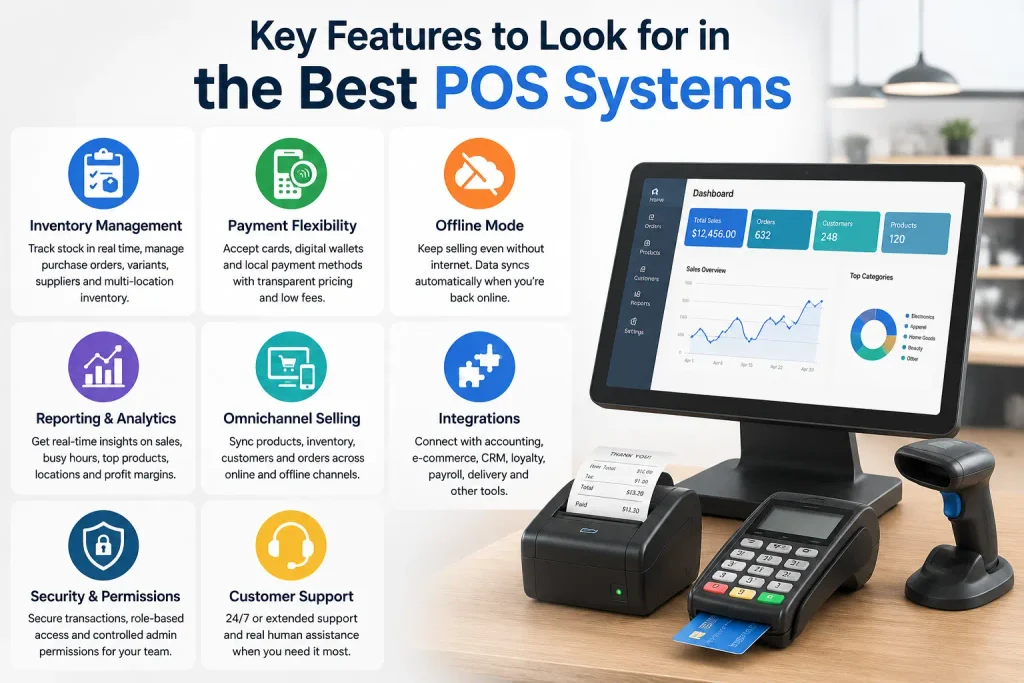
A modern POS should do more than record a sale. Before signing a contract, focus on the capabilities your staff will actually use.
Inventory Management
At minimum, stock should update as products sell. Retailers with larger catalogs should look for purchase orders, variants, low-stock alerts, supplier management, multi-location transfers and inventory reporting.
Payment Flexibility
Check which cards, digital wallets and local payment methods the system accepts. More importantly, understand how each method is priced.
Offline Mode
An internet outage shouldn’t automatically stop your business from trading. Confirm exactly which functions continue offline and how transactions synchronize after connectivity returns.
Reporting and Analytics
Useful POS reporting should answer practical questions: What sells? When are the busiest hours? Which location performs best? Which items are losing margin?
Omnichannel Selling
Businesses operating physical and online stores should be able to synchronize products, inventory, customers and orders instead of maintaining two separate databases.
Integrations
Check compatibility with your accounting, payroll, e-commerce, loyalty, delivery and CRM tools before purchasing.
Security and Permissions
Modern systems should support secure payments, role-based staff access and controlled administrative permissions.
Customer Support
POS failures affect revenue immediately. Support hours, response channels and access to human assistance matter much more here than with ordinary office software.
How Much Does a POS System Cost in 2026?
A POS’s advertised monthly price is only one part of its real cost.
You should calculate:
Software: Free to several hundred dollars per month depending on features and locations.
Hardware: Readers can be relatively inexpensive, while full registers, customer displays, kitchen systems and multiple terminals can push hardware costs much higher.
Payment processing: Usually the biggest recurring variable for businesses processing large volumes.
Add-ons: Loyalty, payroll, advanced inventory, reservations, marketing and e-commerce may be separate subscriptions.
Implementation: Larger restaurants and multi-location retailers may also pay for installation, configuration, migration and training.
Lightspeed similarly describes POS cost as a combination of hardware, software subscriptions and variable payment transaction rates rather than one sticker price.
Don’t Choose Based on Monthly Price Alone
Consider two POS systems:
- System A costs $0/month but has higher processing fees.
- System B costs $89/month but provides lower rates or eliminates other software your business currently pays for.
At sufficient transaction volume, System B can potentially cost less overall.
Always estimate total annual cost of ownership, not just subscription price.
Cloud POS vs Traditional POS
Most modern platforms are cloud-based or cloud-connected.
| Feature | Cloud POS | Traditional POS |
|---|---|---|
| Remote access | Usually yes | Limited |
| Automatic updates | Usually | Often manual |
| Multi-location management | Easier | More difficult |
| Upfront infrastructure | Usually lower | Often higher |
| Integrations | Extensive | Often limited |
| Internet dependence | Varies | Usually lower |
| Scalability | Strong | More hardware-dependent |
For most new businesses, cloud POS is the more flexible choice. Businesses operating in areas with unreliable connectivity should pay particular attention to offline capabilities rather than assuming every cloud POS behaves the same way.
POS Technology Trends to Watch in 2026
POS technology is moving toward connected commerce rather than isolated checkout terminals.
AI-assisted insights can increasingly help merchants spot sales patterns, identify unusual activity and surface inventory or profitability opportunities.
Mobile POS allows employees to take payments anywhere in a store, restaurant or event instead of forcing customers into a traditional checkout queue.
Unified commerce is also becoming more important. Retailers want one view of inventory, customers and orders regardless of whether a transaction starts online or in-store.
Finally, automation and integrations matter more than feature count. A POS that automatically passes accurate information to accounting, inventory, e-commerce and customer systems can remove significant manual work.
How to Choose the Right POS System
Start with your business requirements rather than a brand name.
First, identify the workflows you cannot compromise on—whether that’s restaurant tables, advanced inventory, online-store synchronization or mobile selling. Then estimate your monthly transaction volume and calculate payment-processing costs alongside software and hardware.
Check the tools you already use. Replacing your accounting, e-commerce or loyalty software simply because the new POS doesn’t integrate with it can make an apparently inexpensive migration very costly.
Before signing, request a demo and test realistic scenarios: process a refund, find an item, change inventory, disconnect the internet, generate a report and add an employee. Your staff will repeat these actions thousands of times; small usability problems quickly become operational problems.
Final Thought
For most small businesses in supported markets, Square is our best overall starting point because of its low barrier to entry and broad ecosystem. Toast is the stronger specialist choice for restaurants, while Shopify POS makes the most sense for retailers that want physical stores tightly connected to e-commerce.
For retailers with demanding inventory requirements, Lightspeed is worth the higher starting cost. Clover stands out for hardware flexibility, while TouchBistro and SpotOn deserve consideration from restaurant operators.
The important point is that the best POS isn’t the one with the longest feature list. It’s the system that fits your transactions, inventory, staff, locations, existing software and growth plans without creating unnecessary complexity.
Frequently Asked Questions
What are the best POS systems?
The best POS systems in 2026 include Square, Toast, Shopify POS, Lightspeed, Clover, TouchBistro, SpotOn, Helcim, Loyverse and PayPal POS. The right choice depends on whether you operate retail, restaurants, e-commerce, services or mobile sales.
What is the best POS system in Pakistan?
There isn’t one system that’s best for every Pakistani business. Local options such as Candela, Nimbus RMS, CISePOS, Oscar POS and Moneypex are worth evaluating where FBR compliance, PKR workflows, offline billing and local support are priorities.
Which POS software is the best?
Square is a strong general-purpose option for smaller businesses in supported markets. Toast is better suited to restaurants, Shopify POS to omnichannel retailers and Lightspeed to retailers requiring advanced inventory management.
Which POS machine is best?
It depends on where and how payments are taken. Clover offers a particularly broad hardware ecosystem, while Square provides options ranging from mobile readers to full registers. Restaurants should also consider purpose-built hardware from Toast or SpotOn.
Which POS systems offer the most reliable customer support?
Support quality can vary by plan and market, but Toast currently advertises 24/7/365 customer care, SpotOn includes 24/7 support with its listed POS plans, and TouchBistro documents 24/7/365 phone, chat and email support.
What are the key features to look for in a modern POS system?
Prioritize reliable payment processing, inventory management, reporting, offline capability, staff permissions, customer management, integrations and responsive support. Multi-location businesses should also check centralized inventory and reporting.
What are the best POS systems for small retail stores?
Square is a strong option for smaller retailers because businesses can start with free POS software and expand later. Shopify POS works well for stores that also sell online, while Loyverse can suit micro businesses with straightforward requirements.
Which POS systems offer the best inventory management tools?
Lightspeed is particularly strong for inventory-heavy retailers, while Shopify POS is valuable when inventory must remain synchronized between online and physical stores. Square can be sufficient for smaller retailers with less complex inventory requirements.
Where can I find reviews of top-rated POS systems?
Start with independent technology and business publications, software review platforms and verified merchant reviews. Then confirm pricing, functionality and contract terms on the provider’s official website because third-party reviews can become outdated quickly.
What does a POS system do?
A POS system processes sales and records transactions. Modern systems can also update inventory, manage customers and employees, generate reports, accept different payment methods and connect sales with e-commerce or accounting software.
What is POS with an example?
POS means Point of Sale—the place and technology used to complete a transaction. For example, when a customer buys a shirt in a store, the cashier scans its barcode, the POS calculates the total, accepts payment, prints or sends the receipt and automatically reduces that shirt’s inventory count.