

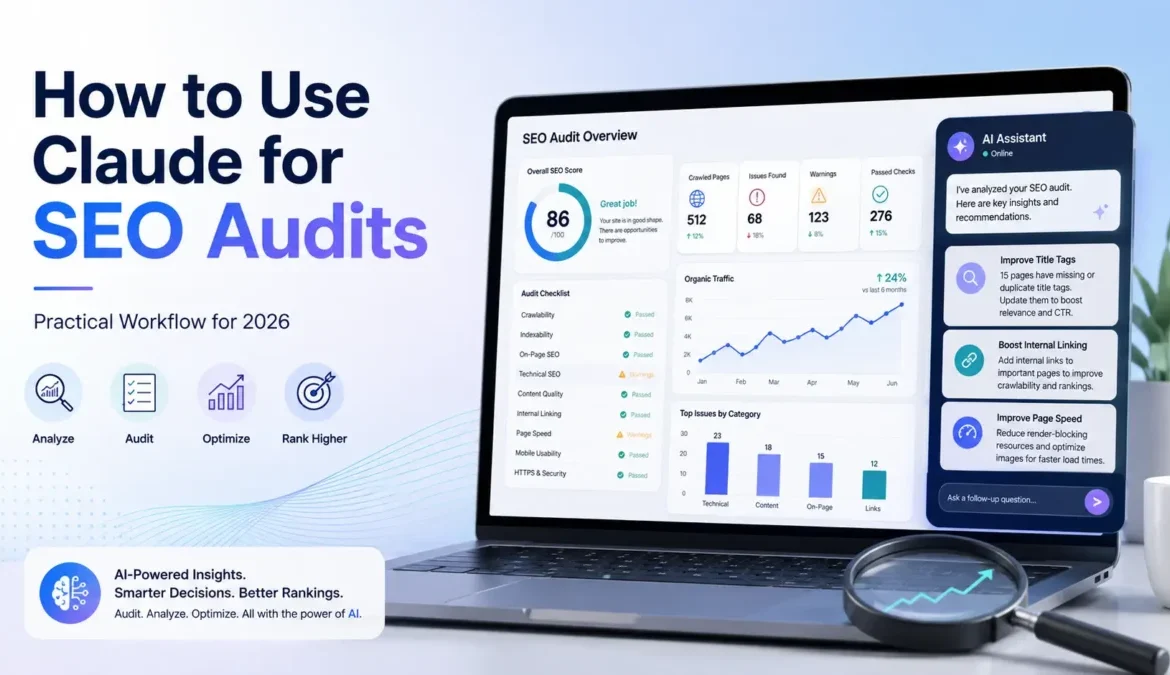
The easiest answer to how to use Claude for an SEO audit is to give it reliable SEO data, tell it exactly what you want checked, and ask it to prioritize the findings. Claude is most useful as the analysis layer of an audit. It can review crawl exports, Google Search Console data, page content, internal links, metadata, and keyword opportunities, but it should not replace your crawler, Search Console, PageSpeed testing, or final SEO judgment.
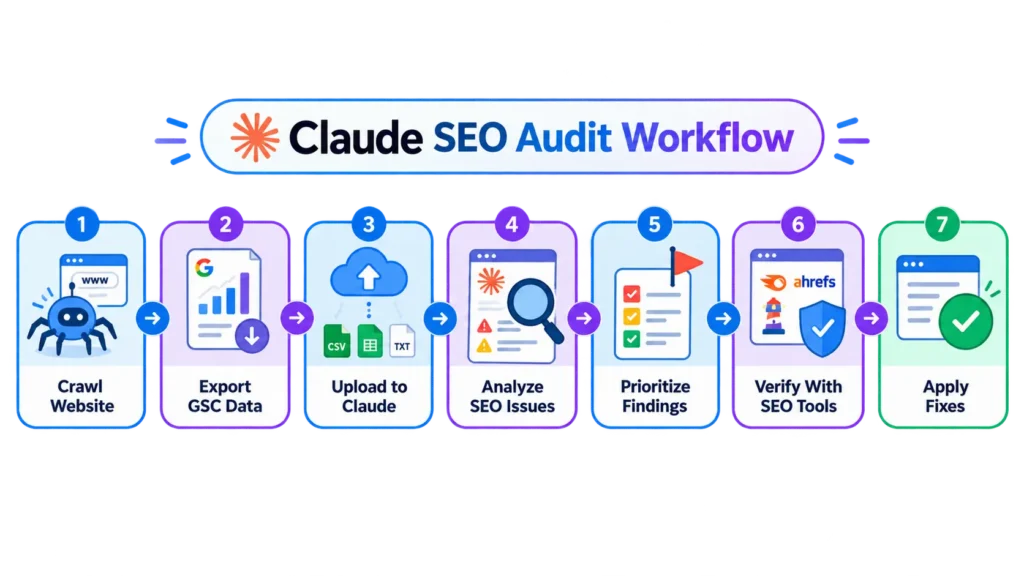
In practice, the workflow is simple: collect the data → upload it → give Claude a focused audit prompt → review priorities → verify the important findings.
In simple terms, this is how the Claude SEO audit workflow usually looks:
Can Claude Do an SEO Audit?
Yes, but there is an important distinction. Claude can analyze an SEO audit very well, but it is not automatically the same thing as an SEO crawler.
If you give Claude a clean Screaming Frog export, GSC data, or page content, it can quickly spot patterns such as:
- missing or weak title tags;
- duplicate metadata;
- thin pages;
- broken internal links;
- poor heading structure;
- keyword cannibalization;
- weak internal linking;
- pages with high impressions but low CTR;
- content gaps;
- pages that need updating.
Where people often go wrong is asking:
Audit my entire website for SEO.
That is too vague. Claude usually gives much better results when you tell it what data it is looking at, what the business goal is, and what kind of issues you want prioritized.
What You Need Before Starting
You do not need a complicated setup. For a useful Claude SEO audit, I normally recommend preparing at least one of these:
Screaming Frog Crawl Export
A Screaming Frog export gives Claude structured technical data such as:
- URLs;
- status codes;
- titles;
- meta descriptions;
- H1s;
- canonicals;
- indexability;
- word counts;
- internal links.
Screaming Frog supports CSV and Excel exports, which makes the data easy to move into an AI-assisted analysis workflow.
Google Search Console Export
For an existing site, GSC is often even more useful because it tells you what Google is already showing.
Export:
- queries;
- pages;
- clicks;
- impressions;
- CTR;
- average position.
This is where Claude becomes particularly useful because it can group hundreds or thousands of rows into patterns that would take much longer to review manually.
Page Content or HTML
For a single-page audit, you can give Claude:
- the page copy;
- HTML;
- title and meta description;
- target keyword;
- competitor examples.
This works well for on-page SEO and content analysis.
Keyword or Competitor Data
If you have Semrush, Ahrefs, or another keyword tool, you can also upload keyword exports and ask Claude to identify:
- low-difficulty opportunities;
- missing subtopics;
- overlapping search intent;
- keyword clusters;
- pages worth refreshing first.
Claude becomes more useful when SEO data comes from several connected sources rather than a single report. That mirrors the role of API integration, where separate systems exchange data so it can be used in a larger workflow.
How to Use Claude for SEO Audit
Here is the workflow I would actually use.
1. Collect the SEO Data
Do not ask Claude to guess what is happening on the website. Give it evidence.
For a sitewide audit, that usually means:
Screaming Frog + Google Search Console
For a content audit, it might be:
GSC + keyword data + the actual page content
For a single-page optimization:
page content + target keyword + competitor information
The quality of the audit depends heavily on the quality of the input.
2. Upload the Data to Claude
Upload the CSV, Excel file, document, or relevant text. If you have several exports, tell Claude what each one contains before asking for conclusions.
For example:
This file contains a Screaming Frog crawl of 650 URLs. The second file contains GSC page-level performance for the last 90 days. I want to identify technical problems and pages with the best opportunity for organic growth.
That context makes a noticeable difference.
3. Tell Claude What You Want Audited
Avoid asking for everything at once. A technical audit, content audit, and CTR audit are different jobs.
You might ask Claude to focus on:
- technical SEO;
- on-page SEO;
- content quality;
- internal linking;
- search performance;
- keyword opportunities;
- AEO/GEO readiness.
I usually prefer splitting the work into clear stages rather than asking for a 50-point audit in one prompt.
4. Ask Claude to Prioritize the Findings
This is where Claude is more useful than a raw crawler export. A crawler may find 2,000 issues. That does not mean all 2,000 deserve equal attention.
Ask Claude to group findings into:
Critical
Problems that can directly affect crawling, indexing, or major rankings.
High Priority
Issues affecting important pages or large groups of URLs.
Quick Wins
Changes likely to produce useful results without major development work.
Low Priority
Items worth fixing later but unlikely to change performance significantly.
This turns an audit into an actual action plan.
5. Verify Important Findings
Never publish a recommendation just because Claude generated it.
- If Claude says a page is not indexed, check GSC.
- If it says a URL redirects incorrectly, test the URL.
- If it identifies Core Web Vitals problems, check PageSpeed Insights or CrUX.
- If it recommends merging two pages because of cannibalization, review the actual SERP and query data before doing it.
Claude can dramatically speed up analysis, but your SEO tools remain the source of truth.
Copy-Paste Claude SEO Audit Prompt
You do not need twenty different prompts. For most audits, one well-structured prompt is enough to start.
Analyze the attached SEO data as a senior SEO consultant. Identify technical SEO, on-page, content, internal linking, and search-performance issues that could affect organic visibility. Do not treat every issue equally. Group your findings into Critical, High Priority, Quick Wins, and Low Priority. For every important issue, explain the evidence in the data, which URLs are affected, why it matters for SEO, and the recommended action. Avoid generic recommendations that are not supported by the uploaded data. Finish with a prioritized action plan showing what should be fixed first.
That final instruction matters:
Do not make recommendations that are not supported by the data.
It reduces a lot of generic AI output.
What Claude Can Check Well
Claude is particularly useful when the task involves finding patterns across a lot of information.
Technical SEO Patterns
From crawler data, it can help identify:
- large groups of 404s;
- redirect chains;
- missing canonicals;
- non-indexable pages;
- duplicate titles;
- missing H1s;
- unusual URL patterns;
- internal linking problems.
A tool such as Screaming Frog is still doing the crawling. Claude is helping you understand what the crawl actually means.
On-Page SEO
Claude can compare:
- titles;
- H1s;
- meta descriptions;
- headings;
- page copy;
- target keywords;
- search intent.
It is also useful for finding cases where ten different pages use almost identical titles.
Content Quality
This is one of Claude’s stronger areas.
It can help detect:
- thin sections;
- repeated explanations;
- missing questions;
- outdated information;
- weak introductions;
- search intent mismatch;
- content that says a lot without actually answering the query.
I would still make the final editorial decision myself rather than accepting every suggested rewrite.
Internal Linking
If you provide crawl data containing inlinks and outlinks, Claude can help surface:
- important pages with very few internal links;
- orphan-like content;
- weak anchor patterns;
- natural linking opportunities between related pages.
Screaming Frog can bulk-export inlink and outlink information, which makes this type of analysis possible at scale.
Search Opportunity Analysis
Google Search Console data is where Claude can save a lot of manual spreadsheet work.
For example, ask it to identify:
- pages ranking in positions 5–20;
- high-impression pages with weak CTR;
- queries a page is getting impressions for but barely mentions;
- pages losing clicks;
- groups of related queries that could justify a content refresh.
This is generally more valuable than asking Claude to invent new keywords from scratch.
Using Claude With Google Search Console
A simple GSC workflow is:
Export the last 3–6 months of page/query data → upload it → ask Claude to find opportunities.
For example:
Find pages receiving at least 500 impressions that rank between positions 5 and 20. For each page, identify the queries creating those impressions, possible intent gaps, and the most realistic optimization opportunity. Prioritize pages where a relatively small improvement could increase clicks.
That is a much more useful prompt than:
How do I improve my SEO?
You are giving Claude a measurable problem to solve.
Using Claude With Screaming Frog
The workflow is similar.
Run your crawl first. Then export the relevant data. Screaming Frog lets you export crawl tabs, filtered views, inlinks, outlinks, issue reports, and other crawl information in spreadsheet formats.
Then ask Claude questions such as:
Which technical issues affect the largest number of indexable pages?
or:
Find important URLs receiving very few internal links compared with the rest of the site.
or:
Identify duplicate or near-duplicate title patterns and suggest a rule for fixing them rather than rewriting every title individually.
That last part is important.
Good SEO auditing is often about finding patterns and systems, not manually fixing one URL at a time.
What Claude Cannot Reliably Audit by Itself
This is where I would be careful. Claude should not be treated as a replacement for:
- a website crawler;
- Google Search Console;
- Google Analytics;
- PageSpeed Insights;
- rank tracking;
- backlink databases;
- log-file analysis;
- real indexing checks;
- manual SERP review.
It can analyze information from those systems, but it does not make the underlying evidence unnecessary. This is also consistent with how agentic tools perform more broadly: Anthropic’s own research on Claude Code found that outcomes improve when the human brings stronger domain expertise and makes the planning decisions, while Claude handles more of the execution.
That is a useful way to think about SEO too.
You decide what matters. Claude helps process the work.
Claude Chat vs Claude Code for SEO Audits
You do not need Claude Code for every SEO audit.
| Claude Chat | Claude Code |
|---|---|
| Easier for beginners | Better for advanced workflows |
| Good for uploaded CSVs and documents | Better when working with local files and scripts |
| Strong for GSC/content analysis | Better for repeatable or automated audits |
| Little setup required | Requires more technical setup |
| Best for one-off analysis | Better for ongoing workflows |
For most SEO specialists who simply want to review a crawl export or GSC data, regular Claude AI is enough.
Claude Code becomes more interesting when you want Claude to work across many local files, execute scripts, or build repeatable workflows. Anthropic’s 2026 research also shows Claude Code usage expanding beyond coding into activities such as data analysis and document work.
Can Claude Automate SEO Audits?
Increasingly, yes. New Claude SEO skills and plugins can automate more of the process instead of requiring you to manually upload every export and write every prompt.
That is different from the workflow in this article. A traditional Claude audit looks like:
SEO tool → export data → Claude → recommendations
A more automated Claude SEO workflow can connect more of those stages together and use specialized commands or agents.
I would still understand the manual workflow first. When you know what a good audit should contain, it becomes much easier to judge whether an automated SEO agent is actually doing useful work or simply producing a long report.
A Simple Claude SEO Audit Workflow
If you want to keep the process straightforward, use this:
1. Crawl the website
Use Screaming Frog or another reliable crawler.
2. Export search data
Use Google Search Console.
3. Upload both to Claude
Explain what each dataset contains.
4. Ask for prioritized findings
Critical → High Priority → Quick Wins → Low Priority.
5. Verify the recommendations
Check the important issues in the original tools before making changes.
That is really the whole process.
You do not need a complicated AI stack to get value from Claude.
Final Takeaway
Claude can make SEO audits faster, but I would use it as an SEO analyst rather than an SEO tool replacement.
Let your crawler collect technical evidence. Let Search Console tell you what Google is actually doing. Then use Claude to connect those signals, find patterns, prioritize work, and turn messy exports into a clear action plan.
The biggest improvement usually comes from giving Claude better data and narrower instructions, not from writing increasingly complicated prompts.
Once you are comfortable with that workflow, automated Claude SEO plugins and agent-based audits become the logical next step.