


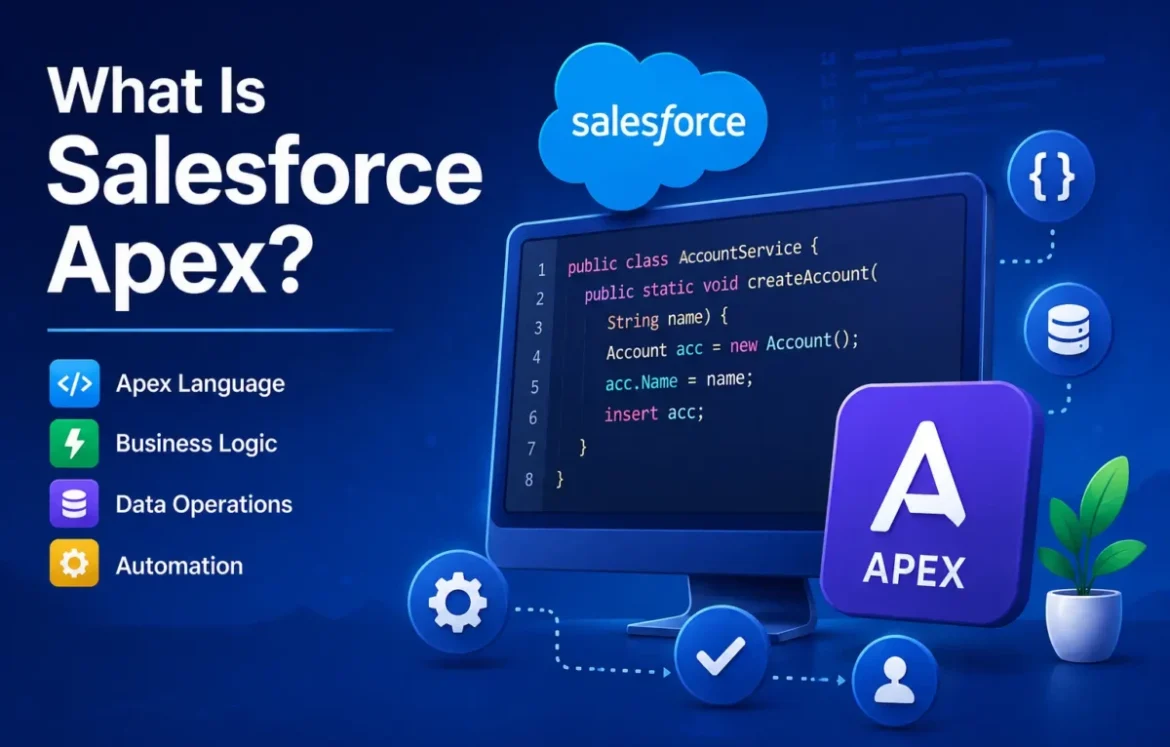
Salesforce Apex is a strongly typed, object-oriented programming language used to add custom business logic to the Salesforce Platform. It runs on Salesforce servers and lets developers work with Salesforce data, respond to record changes, build integrations, execute background processes, and create functionality that requires programmatic control.
Apex uses Java-like syntax, but it is not Java. It is a separate, Salesforce-specific programming language designed to work closely with Salesforce records and the platform’s multitenant architecture. Salesforce describes Apex as hosted, object-oriented, strongly typed, and multitenant-aware.
For beginners, the easiest way to understand Apex is to think of it as the coding layer of Salesforce: declarative tools handle many configurations visually, while Apex gives developers code-level control when requirements call for it.
Salesforce Apex at a Glance
| Question | Quick Answer |
|---|---|
| What is Salesforce Apex? | Salesforce’s programming language for custom business logic |
| Is Apex a coding language? | Yes |
| Language type | Strongly typed and object-oriented |
| Syntax resembles | Java |
| Where does Apex run? | On the Salesforce Platform |
| Front end or backend? | Primarily server-side/backend |
| How does it query data? | SOQL |
| How does it change records? | DML |
| Common uses | Classes, triggers, integrations, automation and background processing |
| Declarative alternative | Salesforce Flow |
What Is Apex in Salesforce?
Apex is Salesforce’s server-side programming language for implementing custom business logic on the Salesforce Platform. Developers can use it to work with Salesforce records, respond to system events, execute database operations, expose or consume services, and implement logic that requires code.
Salesforce says Apex can add business logic to system events such as record updates and can be initiated by triggers and web-service requests.
Salesforce Apex in simple terms
Imagine a company wants Salesforce to perform a specialized action whenever a particular business event occurs.
If the requirement can be handled cleanly with Salesforce’s declarative tools, custom code may not be necessary. When programmatic control is required, Apex gives developers the ability to define that logic in code.
In short:
Salesforce configuration defines what the platform should do using built-in tools; Apex lets developers program custom behavior when code is appropriate.
How Does Salesforce Apex Work?
Apex executes on Salesforce infrastructure.
A simplified Apex transaction can be understood as:
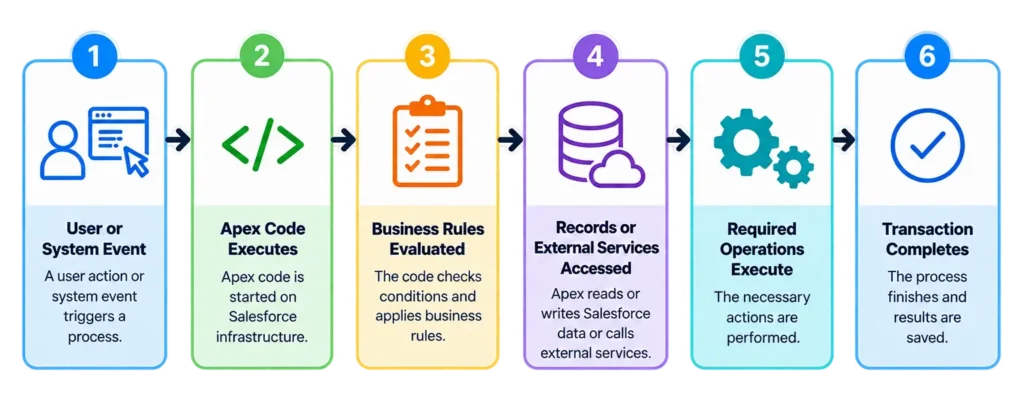
For example, suppose a company wants to automatically perform additional processing when a new customer record is created.
An event can initiate Apex logic, which evaluates the record, retrieves any additional information it needs, performs the required operations, and completes the transaction.
Because Apex operates inside Salesforce’s multitenant environment, its execution is subject to platform limits designed to prevent individual transactions from consuming excessive shared resources.
Key Features of Salesforce Apex
Understanding a few characteristics makes the rest of Apex much easier to learn.
Apex is object-oriented
Apex supports classes, interfaces, inheritance, objects, and other object-oriented programming concepts.
Apex is strongly typed
Variables and references have defined types, and Salesforce validates those references accordingly.
Apex is hosted
Developers don’t run Apex as a standalone application language. Apex is saved, compiled, and executed on the Salesforce Platform.
Apex is data-focused
Apex is designed to work closely with Salesforce data. SOQL retrieves records, while DML operations create or modify them.
Apex is multitenant-aware
Salesforce infrastructure serves multiple customers. Apex therefore operates under governor limits that help prevent individual transactions from monopolizing shared resources.
Salesforce Apex Syntax With a Simple Example
Here is a basic Apex class:
public class GreetingExample {
    public static void sayHello() {
        System.debug('Hello, Salesforce!');
    }
}
Let’s break it down.
public class GreetingExample defines a class named GreetingExample.
public static void sayHello() defines a method named sayHello.
System.debug() writes information to the debug log.
The syntax may look familiar if you have previously worked with Java or another C-style language.
Real Salesforce development quickly becomes more interesting because Apex can work directly with Salesforce objects and records.
Apex Data Types and Collections
Apex supports common data types including String, Integer, Boolean, Decimal, Date, Datetime, and Id.
It also supports collections that developers use to handle groups of values or records.
| Collection | Purpose |
|---|---|
| List | Ordered collection that can contain duplicates |
| Set | Collection of unique elements |
| Map | Collection of key-value pairs |
Salesforce developers frequently use collections because Apex code should often be designed to process multiple records efficiently rather than assuming it will receive only one record.
Another particularly important Apex data type is the sObject.
What Is an sObject in Apex?
An sObject is an Apex data type that represents a Salesforce record. An Account, Contact, Opportunity, or custom Salesforce object can be represented in Apex using an sObject.
Salesforce describes sObjects as complex data types that hold the field values belonging to a Salesforce record.
For example:
Account acc = new Account();
acc.Name = 'Future Tech';
This creates an Account sObject in memory and sets its Name field.
It does not yet save the Account as a database record.
To persist that record, Apex can use DML.
That gives us a useful beginner mental model:
sObject = record representation
SOQL = retrieve records
DML = change or persist records
What Is SOQL in Salesforce Apex?
SOQL, or Salesforce Object Query Language, is the query language used to retrieve records from Salesforce data. Apex developers can embed SOQL directly within their code.
Salesforce describes SOQL as similar to SQL but specifically customized for the Salesforce Platform.
A basic query looks like this:
List<Account> accounts = [
    SELECT Id, Name
    FROM Account
    LIMIT 10
];
This query asks Salesforce for up to 10 Account records and retrieves their Id and Name fields.
Basic SOQL follows a familiar pattern:
SELECT fields
FROM Object
WHERE conditions
The WHERE clause is optional.
SOQL vs SQL
SOQL resembles SQL, but the two aren’t interchangeable. SOQL is designed around Salesforce’s object data model and has Salesforce-specific capabilities and restrictions.
The most important beginner takeaway is:
SOQL retrieves Salesforce records.
What Is DML in Salesforce Apex?
DML, or Data Manipulation Language, is used in Apex to create and modify Salesforce records.
Salesforce documents DML operations for inserting, updating, merging, deleting, and restoring records.
Common operations include:
| DML Operation | Purpose |
|---|---|
insert |
Create a record |
update |
Modify a record |
upsert |
Insert or update a record |
delete |
Delete a record |
undelete |
Restore an eligible deleted record |
merge |
Merge supported records |
For example:
Account acc = new Account(Name='Future Tech');
insert acc;
The first line creates an Account in memory.
The second uses insert to persist it as a Salesforce record.
SOQL vs DML
This distinction is worth remembering:
SOQL reads Salesforce data; DML changes Salesforce data.
Salesforce similarly distinguishes querying existing records with SOQL from creating and modifying them through DML.
What Is an Apex Class?
An Apex class is a structure for organizing variables, methods, and reusable business logic written in Apex.
A simple class might look like:
public class AccountHelper {

    public static Account createAccount(String accountName) {
        Account acc = new Account(Name = accountName);
        insert acc;
        return acc;
    }

}
Here, AccountHelper contains a method that receives an account name, creates an Account record, inserts it, and returns the resulting Account.
Real applications require considerably more consideration around validation, errors, security, bulk processing, testing, and architecture, but the example demonstrates the basic relationship:
Class → method → business logic → Salesforce operation
What Is an Apex Trigger?
An Apex trigger is code that automatically executes in response to specified changes to Salesforce records. Triggers can run around events such as record insertion, updates, deletion, and restoration.
Salesforce documentation describes Apex as supporting business logic initiated by triggers on Salesforce objects.
Two concepts beginners frequently encounter are before and after triggers.
Before triggers
Before triggers execute before the corresponding record operation is completed and are commonly useful when values on the records being processed need to be modified or validated.
After triggers
After triggers execute after the records have been saved and are useful when subsequent logic depends on saved record information or related operations.
A trigger should not automatically become a container for all of an application’s business logic. Maintainable Salesforce implementations commonly separate responsibilities rather than allowing triggers to grow into large blocks of tightly coupled code.
What Are Salesforce Apex Governor Limits?
Apex governor limits are runtime limits that restrict how many Salesforce platform resources a transaction can consume.
Why does Apex need them?
Salesforce is a multitenant platform, meaning infrastructure resources are shared. Salesforce explains that Apex enforces limits to prevent runaway code from monopolizing those shared resources.
Think of it this way:
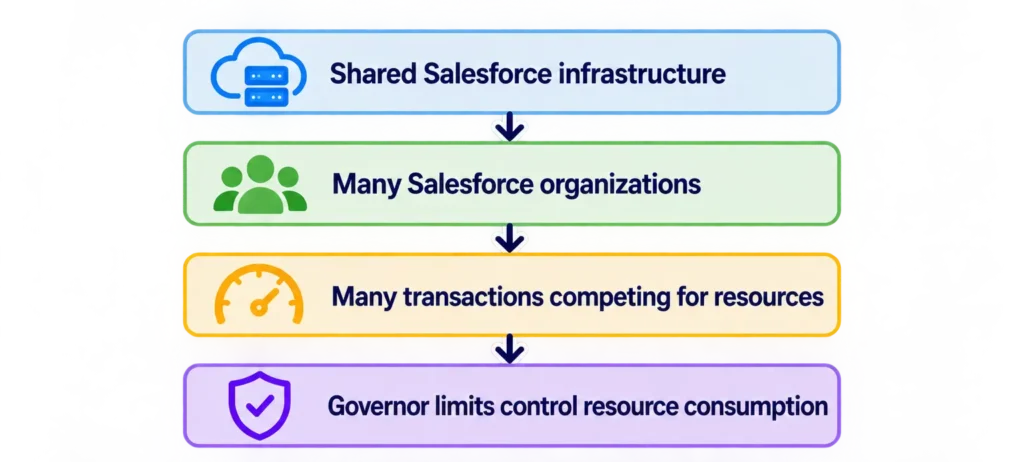
Governor limits apply to areas such as:
- database queries;
- DML operations;
- CPU time;
- memory/heap;
- asynchronous processing and other platform resources.
One practical example is DML. Salesforce currently documents a limit of 150 DML statements per Apex transaction and recommends bulk DML operations to reduce resource consumption.
Exact limits can depend on the execution context, so developers should consult current Salesforce documentation rather than relying on an old limits table.
Why Bulkification Matters in Apex
Bulkification means designing Apex code to process multiple records efficiently instead of assuming that only one record will be processed.
Consider performing an operation for 100 contacts.
An inefficient implementation might execute one database operation for each contact.
A bulk-oriented implementation can collect the records and perform the operation on the collection.
Salesforce explicitly recommends performing DML on lists of sObjects because a bulk operation on a list counts as one DML statement rather than one statement for every record in that list.
Bulkification is therefore not merely a coding style preference. It helps Apex applications work within the resource constraints of Salesforce’s multitenant platform.
Salesforce Flow vs Apex: What’s the Difference?
Salesforce Flow is a declarative automation tool, while Apex is a programming language. Both can implement business processes, and the appropriate choice depends on the requirement rather than one being universally better.
| Factor | Salesforce Flow | Salesforce Apex |
|---|---|---|
| Development style | Declarative | Programmatic |
| Interface | Visual | Code |
| Coding required | Usually no | Yes |
| Typical users | Admins and developers | Developers |
| Custom algorithms | More constrained | Greater control |
| Code testing | Not Apex code | Apex testing required |
| Maintenance | Visual configuration | Source code |
A useful principle is:
Use the simplest maintainable Salesforce solution that meets the requirement.
Apex becomes particularly relevant when a requirement needs programmatic behavior, complex processing, or integrations that are not practical to implement cleanly with declarative tools.
The choice should be based on architecture and maintainability—not on the assumption that code is automatically better.
Salesforce Apex vs Oracle APEX
Despite their similar names, Salesforce Apex and Oracle APEX are different technologies.
Salesforce Apex is Salesforce’s server-side programming language for implementing business logic on the Salesforce Platform.
Oracle APEX refers to Oracle Application Express, a low-code application-development platform associated with Oracle Database.
If you’re searching for Apex classes, triggers, SOQL, DML, or Salesforce governor limits, you’re looking for Salesforce Apex, not Oracle APEX.
This distinction is particularly useful because searches for “APEX” alone can refer to either technology.
How Do You Write and Run Apex Code?
Salesforce developers can write Apex using Salesforce-supported development tools and workflows.
For beginners, Anonymous Apex is particularly useful for executing snippets without first creating a full class or trigger. Salesforce Trailhead uses Anonymous Apex in its learning material for working with Apex and SOQL.
For project-based development, Salesforce provides developer tooling that supports Apex classes, triggers, testing, deployment, and related workflows.
A beginner should first become comfortable with:
variables → classes → sObjects → SOQL → DML
before moving heavily into:
triggers → testing → governor limits → asynchronous Apex → integrations
This sequence makes the platform-specific concepts easier to understand.
How Does Apex Testing Work?
Apex tests are automated tests written to verify that Apex code behaves as expected. Testing helps developers catch regressions and validate business logic, and it also plays a role in Salesforce deployment requirements.
Salesforce’s current developer documentation states that unit tests are required for deploying or packaging Apex and documents code-coverage requirements associated with deployment.
However, code coverage should not be confused with test quality.
Salesforce’s developer guidance specifically notes that a high code-coverage percentage does not necessarily mean the tests themselves are good; useful tests should validate expected behavior with meaningful assertions and scenarios.
Good Apex testing should consider:
expected behavior, unexpected inputs, bulk scenarios, edge cases, and meaningful assertions.
What Is Asynchronous Apex?
Asynchronous Apex allows certain work to execute separately from the immediate synchronous transaction. It is useful for workloads that are better handled outside the user’s immediate request or that require specialized processing patterns.
Common asynchronous Apex mechanisms include:
Queueable Apex
Batch Apex
Scheduled Apex
and other supported asynchronous patterns.
These approaches solve different problems, so developers shouldn’t choose one simply because it “runs in the background.”
For beginners, it is enough to understand that Apex isn’t limited to code that must complete entirely within the user’s immediate interaction.
Can Salesforce Apex Call an API?
Yes. Apex can participate in integrations between Salesforce and external systems, including making supported HTTP callouts and exposing functionality for external consumers.
This enables scenarios such as:
Salesforce → external payment service
Salesforce → shipping platform
Salesforce → internal business system
external application → Salesforce
Apex integrations still operate within Salesforce platform constraints, and API architecture should account for authentication, limits, errors, transaction boundaries, and security.
Salesforce Apex Best Practices
Good Apex development is about more than getting the code to execute.
A few principles are especially important:
- Design for multiple records. Avoid assuming a trigger or process will always receive one record.
- Avoid unnecessary SOQL and DML inside loops. Repeated database operations can quickly consume transaction limits.
- Use collections effectively. Lists, sets, and maps are fundamental to efficient Apex processing.
- Respect governor limits. Treat platform limits as an architectural constraint rather than something to work around at the last moment.
- Keep responsibilities separated. Avoid placing an application’s entire business logic directly in a trigger.
- Write meaningful tests. Coverage alone doesn’t prove correctness.
- Handle errors deliberately. Consider failure scenarios rather than coding only for the successful path.
- Consider security explicitly. Salesforce developers should follow current platform security guidance rather than assuming every required access rule is automatically enforced by custom code.
When Should You Use Salesforce Apex?
Use Apex when a Salesforce requirement genuinely benefits from programmatic control. This can include complex business logic, specialized record processing, custom integrations, or other functionality that is difficult to implement and maintain cleanly with declarative tools alone.
You may not need Apex when Salesforce’s standard configuration or declarative automation can satisfy the requirement cleanly.
A useful decision model is:
Can standard Salesforce functionality solve it?
↓ No
Can a declarative tool such as Flow solve it cleanly?
↓ No / programmatic control is justified
Consider Apex
This isn’t a rigid rule. Architecture, security, performance, maintainability, team skills, and long-term requirements should also influence the decision.
Is Salesforce Apex Difficult to Learn?
Salesforce Apex is easier to approach if you already understand object-oriented programming, especially Java-like syntax, but Salesforce-specific concepts create an additional learning curve.
Knowing loops and classes isn’t enough.
A Salesforce Apex developer also needs to understand:
Salesforce data model → sObjects → SOQL → DML → classes → triggers → governor limits → testing → asynchronous processing
Salesforce itself recommends introductory learning before progressing into the deeper Apex Basics & Database material.
For a complete beginner, learning the Salesforce platform alongside the language is therefore just as important as memorizing Apex syntax.
Salesforce Apex Beginner Learning Path
A practical order is:
1. Salesforce fundamentals
Understand objects, records, fields, relationships, and the platform.
2. Apex syntax
Learn variables, data types, conditions, loops, methods, and classes.
3. sObjects
Understand how Salesforce records are represented in Apex.
4. SOQL
Learn to retrieve records.
5. DML
Learn to create and modify records.
6. Collections
Become comfortable with Lists, Sets, and Maps.
7. Apex classes
Organize reusable business logic.
8. Triggers
Respond to record events.
9. Governor limits and bulkification
Learn to design for Salesforce’s execution environment.
10. Testing
Verify behavior and understand deployment requirements.
11. Asynchronous Apex and integrations
Move into more advanced application architecture.
Salesforce’s official Trailhead material is particularly valuable once you understand this mental model because it provides structured hands-on exercises.
Salesforce Apex: Beginner’s Mental Model
| Concept | Think of It As |
|---|---|
| Apex | Salesforce programming language |
| sObject | Representation of a Salesforce record |
| SOQL | Retrieve Salesforce records |
| DML | Create or change records |
| Class | Structure for reusable code |
| Method | A defined piece of behavior |
| Trigger | Code responding to record events |
| Governor limit | Platform resource boundary |
| Bulkification | Designing code for many records |
| Test class | Automated verification of Apex behavior |
| Flow | Declarative automation option |
If you’re new to Salesforce Apex, understanding these relationships is more valuable initially than memorizing large amounts of syntax.
Frequently Asked Questions
What is Apex in Salesforce?
Apex is Salesforce’s strongly typed, object-oriented programming language for implementing custom business logic on the Salesforce Platform. It runs on Salesforce servers and can work with records, triggers, database operations, integrations, and other platform functionality.
What is Apex code?
Apex code is source code written in the Salesforce Apex programming language. It can define classes, methods, triggers, database operations, integrations, and other custom logic that executes on the Salesforce Platform.
What is Apex programming?
Apex programming is the practice of developing custom server-side logic for Salesforce using the Apex language. It combines general programming concepts such as classes and methods with Salesforce-specific concepts including sObjects, SOQL, DML, triggers, and governor limits.
Is Salesforce Apex like Java?
Yes, Apex uses Java-like syntax and shares several object-oriented programming concepts with Java, but they are separate languages. Apex is specifically designed to execute within the Salesforce Platform and includes Salesforce-native features such as direct interaction with sObjects, SOQL, and DML.
Is Apex front end or backend?
Apex is primarily a backend, server-side language. Apex code is stored, compiled, and executed on the Salesforce Platform rather than running as front-end browser code.
Is Apex a coding language?
Yes. Apex is a programming language. It is strongly typed, object-oriented, hosted on Salesforce, and designed for implementing business logic that works closely with Salesforce data.
What is an Apex class in Salesforce?
An Apex class organizes reusable Salesforce business logic into variables, methods, and related code. Classes can work with Salesforce records, perform calculations, call other methods, support integrations, and provide logic used elsewhere in an application.
What is the difference between Apex and SOQL?
Apex is a programming language, while SOQL is a query language for retrieving Salesforce records. SOQL queries can be embedded directly inside Apex code.
What is the difference between Salesforce Apex and Oracle APEX?
Salesforce Apex is a programming language for custom business logic on the Salesforce Platform. Oracle APEX, or Oracle Application Express, is a separate low-code application-development technology associated with Oracle. Despite sharing the name “Apex,” they are different products.
Can I learn Salesforce Apex without knowing Java?
Yes. Java knowledge is helpful but not required to learn Salesforce Apex. Beginners can learn Apex directly, although prior experience with object-oriented programming can make concepts such as classes, methods, variables, loops, and data types easier to understand.
Final Takeaway
Salesforce Apex is the programming language developers use to implement custom server-side business logic on the Salesforce Platform. It combines familiar object-oriented programming concepts with Salesforce-specific capabilities such as sObjects, SOQL, DML, triggers, and direct access to platform data.
For beginners, the most important concepts to understand are not advanced syntax. Start with the relationship between Apex, Salesforce records, SOQL, DML, classes, triggers, and governor limits.
Once that mental model is clear, more advanced subjects such as testing, asynchronous Apex, integrations, and scalable application architecture become much easier to understand.
For authoritative technical details and hands-on exercises, Salesforce’s Apex Basics & Database Trailhead module is the appropriate primary reference.
Technical definitions and platform behavior in this guide were reviewed against current Salesforce documentation in August 2026. Salesforce platform features and limits can change, so verify exact limits and deployment requirements against current official documentation when implementing production code.