


- by Ammara Bano
- August 15, 2026

The best project management tools for startups are the ones that add structure without creating another job to manage the software. For engineering-led startups, Linear is one of the strongest choices. ClickUp works well for teams that want an all-in-one workspace, while Notion is useful when projects and documentation need to live together. Asana suits cross-functional teams, and Trello remains a simple option for very small startups.
For this 2026 comparison, we looked at pricing, useful free plans, setup effort, AI and automation, integrations, team type, and how well each platform can grow with a startup.
Best Project Management Tools for Startups at a Glance
| Tool | Best For | Free Plan | Starting Paid Price* | Setup Effort |
|---|---|---|---|---|
| Linear | Engineering and product startups | Yes | $10/user/mo | Low |
| ClickUp | All-in-one project management | Yes | $7/user/mo | Medium |
| Notion | Early-stage teams, docs + projects | Yes | $10/user/mo | Medium |
| Asana | Cross-functional startup teams | Yes | $10.99/user/mo | Low-Medium |
| Trello | Small teams and simple workflows | Yes | $5/user/mo | Very Low |
| Monday.com | Operations and non-technical teams | Yes | $9/seat/mo | Medium |
| Jira | Structured Agile development teams | Yes | $7.91/user/mo | High |
| Plane | Modern product and engineering teams | Yes | $6/seat/mo | Medium |
| Airtable | Data-heavy startup workflows | Yes | $20/user/mo | Medium |
| Basecamp | Startups that value simplicity | Yes | $25/month | Low |
Starting paid prices reflect publicly listed plans checked in September 2026; annual billing applies to several prices. Plans and prices can change.
Linear currently provides a free plan with unlimited members, two teams and up to 250 issues, while its Basic tier is $10 per user per month when billed yearly. Plane’s free cloud plan supports up to 12 users and its Pro plan starts at $6 per seat per month.
Trello’s free plan supports up to 10 collaborators per workspace, and its Standard plan starts at $5 per user per month when billed annually. Jira offers a free tier for up to 10 users, with Standard currently listed at $7.91 per user per month.
How We Chose These Tools
A startup does not need the same project management setup as a 5,000-person enterprise. That is why we did not rank products by feature count alone.
We compared the tools using six practical criteria:
- Startup fit: Does it work for a small team without dedicated project administrators?
- Free-plan value: Can founders genuinely use the free version, or is it mostly a trial?
- Setup effort: How much configuration is required before the team can start working?
- Integrations: Does it connect with tools such as Slack, GitHub, Google Workspace and other common startup software?
- AI and automation: Can it reduce routine project administration?
- Scalability: Will the startup need to migrate as the team grows?
We also reviewed official product and pricing documentation and considered recurring themes in startup-community discussions. One consistent lesson from founder discussions is that simplicity often matters more than having every possible feature.
1. Linear — Best for Engineering and Product Startups
Linear is one of the best project manager tools for startups using GitHub-style development workflows. It focuses on issues, projects, cycles, product initiatives and fast keyboard-driven workflows without the administrative weight that often comes with larger enterprise platforms.
Its free plan supports unlimited members but limits teams and total issues, making it particularly useful for a small engineering startup testing the platform. Paid plans unlock unlimited issues, more teams, administrative controls and deeper insights. Linear also now includes an agent platform and AI-oriented workflows.
What we like
- Fast, uncluttered interface
- Strong product and engineering focus
- API and webhook access
- GitHub-friendly development workflows
- Low setup overhead
Watch out for: Marketing, HR or highly operational teams may find a broader tool such as Asana or ClickUp easier to adapt.
2. ClickUp — Best All-in-One Project Management Tool for Startups
ClickUp tries to replace several separate productivity tools. That can be valuable for a startup that wants to keep costs and software sprawl under control.
Its Free Forever plan remains available, while ClickUp identifies its Unlimited tier as the plan designed for small teams. Official ClickUp material lists the Unlimited plan at $7 per user per month on annual billing, although the company is rolling out newer plan structures with expanded AI functionality to some workspaces.
What we like
- Broad feature set
- Tasks, docs and dashboards in one place
- Native time tracking on paid tiers
- Strong automation options
- Increasingly deep AI capabilities
Watch out for: Flexibility comes with complexity. Small teams can spend too much time configuring ClickUp instead of managing work.
3. Notion — Best for Early-Stage Startups Combining Docs and Projects
Best for: Pre-seed and seed-stage teams where documentation is as important as task tracking.
Notion is not simply project management software. Its strength is combining company documentation, meeting notes, lightweight databases, product planning and tasks in one workspace.
That makes it particularly useful during the early stages of a startup, when processes change quickly and founders may not want separate tools for a wiki, roadmap and basic project tracking. Notion has a free plan, while Plus currently starts at $10 per member per month. Its databases support subtasks, dependencies and custom properties, while Business adds more advanced AI and organizational capabilities.
What we like
- Excellent documentation
- Flexible project databases
- Useful templates
- Strong knowledge-management capabilities
- Increasingly capable AI features
Watch out for: A poorly structured Notion workspace can become difficult to navigate as a company grows.
4. Asana — Best for Cross-Functional Startup Teams
Asana is easier to recommend when several departments need to coordinate rather than only engineers. Teams can work through lists, boards, calendars, timelines and Gantt views, while reporting and automation become more capable on paid plans.
Asana’s Personal plan is free for up to two users. Starter currently begins at $10.99 per user per month when billed annually and adds features such as timelines, Gantt charts, dashboards, forms, custom fields and unlimited automation. Asana has also expanded its AI capabilities during 2026, including AI Teammates and additional AI request allocations for paid organizations.
What we like
- Easy to learn
- Strong cross-team visibility
- Good reporting
- Mature automation
- Wide integration ecosystem
Watch out for: Its free plan is much more restrictive for team collaboration than several competitors.
5. Trello — Best Free Project Management Tool for Small Startups
Trello remains useful because it does not require much explanation. Create a board, add lists such as To Do, Doing and Done, add cards, and start working.
Its free plan currently allows up to 10 collaborators and 10 boards per workspace, with unlimited cards and 250 automation command runs per month. Standard starts at $5 per user per month when billed annually and adds unlimited boards, more automation and AI features.
What we like
- Very fast setup
- Excellent Kanban experience
- Generous enough for tiny teams
- Easy to adopt
- Large Power-Up ecosystem
Watch out for: Reporting, dependencies and managing multiple complex projects become weaker as the startup grows.
6. Monday.com — Best for Operations and Non-Technical Teams
Monday.com is highly visual and customizable. Teams can use boards, dashboards, forms, automations and different project views without adopting an engineering-first workflow.
The free version supports up to two seats and three boards. The Basic tier currently starts at $9 per seat per month on annual billing, with AI functionality becoming more prominent across the platform.
What we like
- Visual interface
- Flexible workflow templates
- Useful dashboards
- Automation and integrations
- Good fit for non-technical departments
Watch out for: The free plan is too limited for many actual startup teams, and costs can rise as headcount increases.
7. Jira — Best for Structured Agile Development Teams
Jira remains one of the most capable Agile project management tools, but capability is exactly why it is not our first recommendation for every startup.
It supports backlogs, boards, timelines, reporting, automation and highly configurable workflows. The free plan supports up to 10 users, while Standard currently costs $7.91 per user per month. Paid plans now also include Atlassian’s Rovo AI capabilities.
What we like
- Powerful Agile workflows
- Excellent issue tracking
- Strong reporting
- Developer ecosystem
- Scales to very large teams
Watch out for: Configuration and administration can be excessive for a five-person startup.
8. Plane — Best Modern Alternative for Product Teams
Plane brings projects, work items, cycles, modules, pages and several visual layouts together in a product-focused interface.
Its free cloud plan supports up to 12 users and includes 500 AI credits per seat, while Pro starts at $6 per seat per month. The platform supports board, list, calendar, Gantt and spreadsheet-style layouts.
What we like
- Startup-oriented free tier
- Product-development workflows
- Built-in AI allowance
- Multiple project views
- Modern interface
Watch out for: It has a smaller ecosystem and shorter track record than Jira, Asana or Trello.
9. Airtable — Best for Data-Heavy Startup Workflows
Airtable sits somewhere between a spreadsheet, database and workflow platform. That makes it useful when a conventional task list is not enough. A startup could use it for recruitment pipelines, content planning, product research, CRM-style workflows or project operations.
Airtable offers a free tier, while its Team plan currently costs $20 per collaborator per month when billed annually or $24 monthly. Team includes Gantt and timeline views, automations, forms and a larger API allowance.
What we like
- Flexible data structure
- Powerful views
- Useful automations
- Strong for operational processes
- Can support unconventional workflows
Watch out for: Building a polished system can take more setup than opening Asana or Trello.
10. Basecamp — Best for Startups That Want Simplicity
Basecamp takes a different approach. It emphasizes projects, communication, to-do lists, schedules, files and straightforward coordination.
Its current free plan supports one project and up to five users. The Freelancer tier costs $25 per month for up to 20 users, while the $59/month Studio plan supports unlimited users and up to 10 active projects. That fixed-price model can become attractive as team size grows.
What we like
- Simple structure
- Low administration
- Flat pricing on larger plans
- Built-in communication
- Time tracking
Watch out for: Teams that need sophisticated Agile, portfolio, resource or automation features may outgrow it.
Which Project Management Tool Should Your Startup Choose?
There is no universal winner.
Use your team type as the starting point:
| Startup Situation | Good Starting Choice |
|---|---|
| Solo founder | Notion or Trello |
| 2–5 person startup | Trello, Notion or ClickUp |
| Engineering startup | Linear |
| Product + engineering | Linear or Plane |
| Cross-functional startup | Asana |
| Marketing/operations team | Monday.com |
| Mature Agile development team | Jira |
| Data-heavy operations | Airtable |
| Wants one tool for most work | ClickUp |
| Wants minimal complexity | Basecamp |
A startup should usually choose the simplest tool that solves its current coordination problem and can survive the next stage of growth.
Overbuying software too early adds process before the business actually needs it.
Best Free Project Management Tools for Startups
If your budget is close to zero, there are several genuinely useful free project management software options.
Trello is our simplest free choice for general task tracking. Linear is stronger for small product and engineering teams. Plane supports up to 12 users on its free cloud plan, while Jira supports up to 10. Notion is useful when you need documentation and basic project databases together.
A search for “project manager tools for startups free download” can be slightly misleading because most modern tools are cloud platforms rather than traditional downloadable desktop software. They usually run in a browser and offer optional desktop or mobile apps.
For teams searching for project manager tools for startups with GitHub, start with Linear, Jira or Plane because their product-development focus is much closer to software engineering workflows.
Free plans should also be evaluated carefully. User limits, automation, AI credits, dashboards, storage or advanced project views may be restricted even when basic task management is free.
What Features Should Startups Look For?
The best project management software for startups should remove coordination work rather than create it.
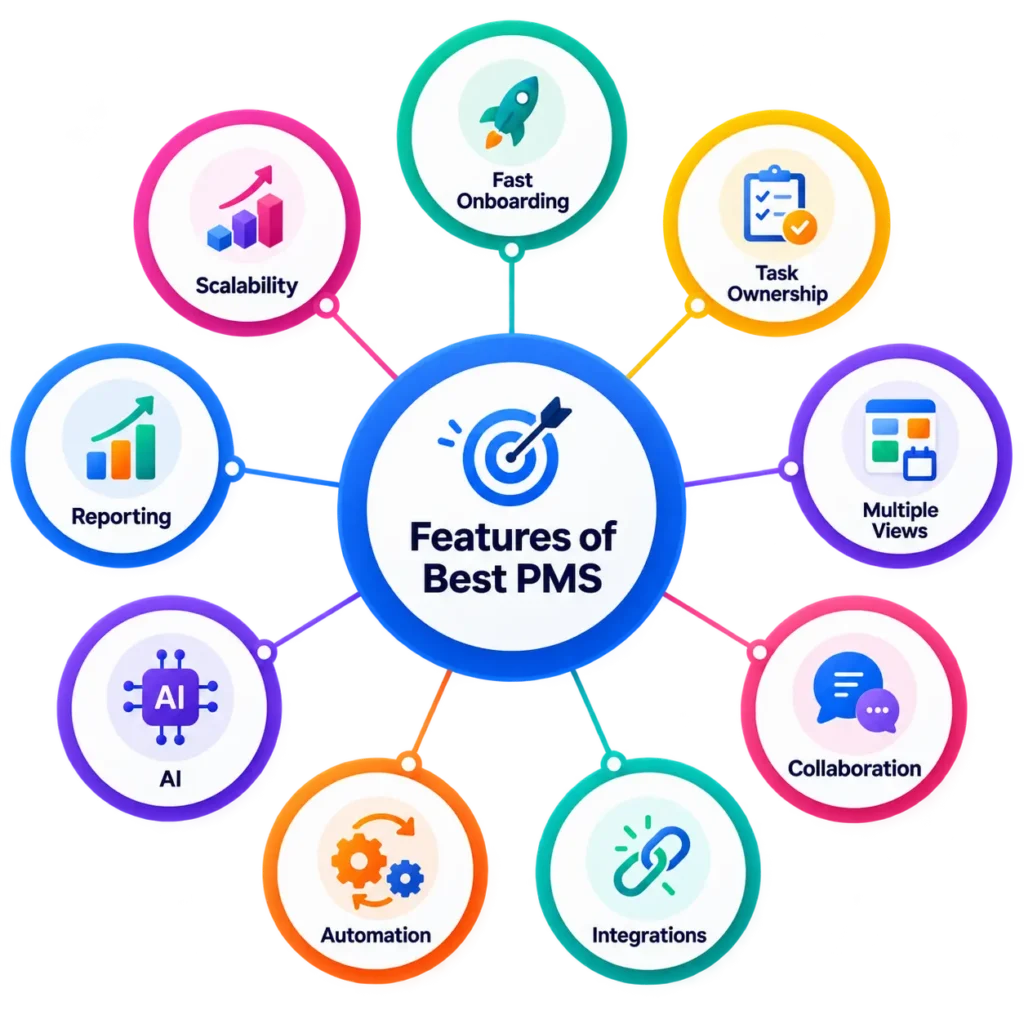
Prioritize these features:
- Fast onboarding: Your team should understand the basics quickly.
- Task ownership: Everyone needs to know who owns what.
- Multiple views: Boards, lists, calendars and timelines serve different teams.
- Collaboration: Comments, mentions and files should live near the work.
- Integrations: Slack, GitHub, Google Workspace and other systems should connect cleanly.
- Automation: Repetitive updates should not depend on someone remembering them.
- AI: Useful AI should summarize, search, prioritize or reduce administrative work.
- Reporting: Visibility becomes more important as the team grows.
- Scalability: Avoid a tool you will need to replace after the next hiring round.
API Integrations & Software Integrations deserve particular attention as they allow software connections. A project tool that shares information cleanly with other applications can reduce duplicate work.
When Is a Simple Task Management Tool Enough?
A three-person startup probably does not need enterprise portfolio management.
If your only questions are:
- What needs to be done?
- Who owns it?
- What is blocked?
- When is it due?
then Trello, Linear, Notion or even a carefully maintained lightweight workflow may be enough.
Adding resource forecasting, complex approvals and fifteen custom task statuses before you have ten employees can slow the team down rather than improve execution. Move to more advanced startup project management software when simple tools stop giving you enough visibility.
When Do You Need Specialized Project Management Software?
General tools work well for most startups, but some industries eventually need specialized systems.
A construction or property startup, for example, may require budgeting, field updates, subcontractor coordination, BIM, inspections and real-estate lifecycle workflows that Asana or Trello do not provide deeply enough.
Common Mistakes Startups Make When Choosing PM Software
Choosing by feature count. More features can mean more configuration, training and clutter.
Ignoring per-seat costs. A price that looks insignificant with five employees can become meaningful with 50.
Overengineering too early. Complex workflows often reflect company complexity that a young startup does not yet have.
Ignoring adoption. A technically superior system is useless if the team avoids using it.
Choosing only for the free plan. Free-plan restrictions can change and may become painful during growth.
Ignoring migration costs. Tasks, discussions, documents and project history become harder to move as the company matures.
Are AI Project Management Tools Worth It in 2026?
AI is increasingly useful in project management, but it should have a clear job.
Useful applications include:
- summarizing project discussions;
- generating tasks from notes;
- searching project knowledge;
- drafting status updates;
- prioritizing work;
- detecting blockers;
- automating repetitive actions.
Current platforms are moving quickly in this direction. Linear offers agent workflows, Jira includes Rovo on paid plans, Plane includes AI credits, ClickUp is expanding AI-heavy plans, and Asana has introduced AI Teammates and additional AI functionality.
For a startup, AI is valuable when it reduces project administration. It is less valuable when it becomes another feature the team has to configure and supervise.
Final Recommendations
If we were narrowing this list of project management tools to a few starting points:
- Best for engineering startups: Linear
- Best all-in-one: ClickUp
- Best for early-stage docs + projects: Notion
- Best cross-functional option: Asana
- Best free/simple option: Trello
- Best for complex Agile development: Jira
- Best newer product-team option: Plane
The right platform is not necessarily the most powerful one.
For startups, the better question is:
Which tool gives our team enough structure without adding unnecessary management overhead?
Start there, then add complexity only when growth makes it necessary.
Frequently Asked Questions
What project management tools do startups use?
Startups commonly use Linear, ClickUp, Notion, Asana, Trello, Monday.com, Jira, Plane, Airtable and Basecamp. Engineering teams often prefer Linear or Jira, while cross-functional startups may prefer Asana, ClickUp or Monday.com.
What are 5 project management tools?
Five popular project management tools are Asana, ClickUp, Trello, Notion and Jira. They cover different needs, from simple Kanban boards and documentation to cross-functional project planning and advanced Agile development.
What are the top 10 project management tools?
For startups in 2026, our top 10 are Linear, ClickUp, Notion, Asana, Trello, Monday.com, Jira, Plane, Airtable and Basecamp. The best option depends on team type, startup stage, integrations and budget.
What is the best project management tool for startups?
There is no single best choice. Linear is excellent for engineering startups, Asana for cross-functional teams, ClickUp for all-in-one project management, Notion for documentation-heavy startups and Trello for small teams wanting simplicity.
What is the best free project management software for startups?
Trello is one of the easiest free options for small general-purpose teams. Linear, Plane and Jira offer stronger free plans for technical teams, while Notion works well when project tracking and documentation need to coexist.
What is the 80/20 rule for project managers?
The 80/20 rule, or Pareto principle, suggests that roughly 80% of results may come from 20% of the work. In project management, it is commonly used as a prioritization idea: identify the small number of tasks, risks or decisions that have the greatest effect on project outcomes.
Sources & Methodology
FutureTechCore reviewed official pricing and product documentation for the platforms included in this guide and compared them on startup fit, free-plan value, setup effort, integrations, AI and automation, scalability and workflow flexibility.
Pricing was checked against official vendor information in September 2026. Software companies frequently change plans, limits and AI allowances, so readers should confirm current pricing before purchasing.
Our editorial approach also avoids ranking every product as universally “best.” A two-person startup and a 50-person engineering organization have very different project-management needs. The recommendations above are therefore based on use case and team fit, not feature count alone.